Never Miss a Lead While Your Crew Is on the Roof
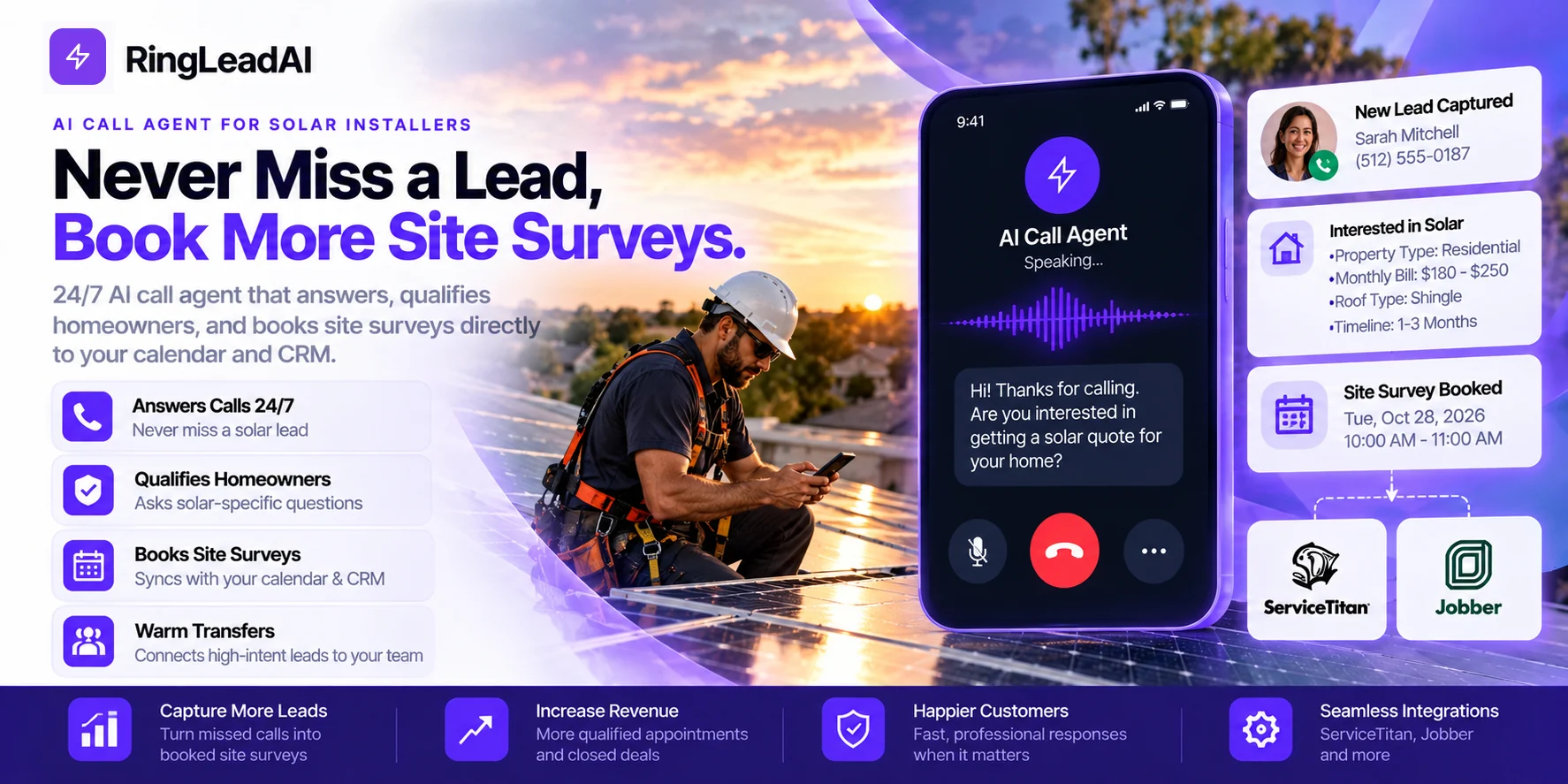
A missed residential solar lead can mean thousands of dollars in potential gross profit. While your crew is on the roof in fall protection, the phone rings. Nobody can safely answer. The homeowner calls another installer.
Solar buyers often contact multiple companies. The installer who responds quickly, answers their questions, and books the next step has a better chance of winning the site survey.
An AI call agent helps close that gap. It answers incoming calls, asks solar-specific qualification questions, books site surveys on your connected calendar, and warm-transfers high-intent callers with their details attached.
In this guide, you'll learn how to capture missed leads, qualify homeowners, connect an AI call agent to your CRM and calendar, handle after-hours battery-backup enquiries, and calculate whether the system pays for itself. You'll also learn how to build TCPA compliance into the workflow instead of treating it as an afterthought.
The Cost of Missed Solar Calls
A missed solar call is not just a missed conversation. It can mean a lost site survey, wasted lead-acquisition spend, and thousands of dollars in potential gross profit.
For solar companies, the problem is operational. The phone rings while the sales rep is driving, the office manager is handling another customer, or the installation crew is working at height. By the time someone calls back, the homeowner may already have booked with another installer.
Missed-Call Cost: Put a Number on the Loss
Consider a residential solar business with these example figures: an average contract value of $22,000, a gross margin of 20%, and a lead-to-sale close rate of 18%.
| Metric | Calculation | Result |
|---|---|---|
| Gross profit per sale | $22,000 × 20% | $4,400 |
| Expected gross profit per lead | $4,400 × 18% | $792 |
At these assumptions, each lead represents approximately $792 in expected gross profit before accounting for lead costs and other acquisition expenses.
If five leads go unanswered, that represents $3,960 in potential expected gross profit at risk — not a guaranteed loss. Some homeowners will call again, and not every unanswered call would have become a sale. But the calculation makes one point clear: missed leads deserve to be measured.
The National Renewable Energy Laboratory (NREL) has documented customer-acquisition costs as a meaningful part of residential solar business costs, including the expense associated with unsuccessful projects. That supports measuring lead handling as an operating cost, rather than treating missed calls as a minor inconvenience.
Why Speed-to-Lead Decides the Sale
Solar homeowners may request quotes from several installers before choosing who visits their property. The first company to respond helpfully has an opportunity to establish trust, understand the project, and book the site survey.
A callback two or three hours later puts your team at a disadvantage. The homeowner may already have spoken with another installer, shared their electricity bill, and scheduled an assessment. Your rep is now competing to recover a lead instead of moving a fresh enquiry forward.
Research on online sales leads supports taking response time seriously: Harvard Business Review's study of lead response found that companies contacting a lead within an hour were far more likely to qualify it than those that waited longer. It is not a solar-specific benchmark, so measure your own results before forecasting a similar lift.
An AI call agent helps by answering the incoming call, collecting qualification answers, and booking the next step on your connected calendar. If a homeowner needs a sales specialist, it can warm-transfer the call and brief the rep on the caller's details and stated requirements.
Track three numbers weekly:
- Time from first enquiry to first response.
- Percentage of qualified leads that book a site survey.
- Percentage of booked surveys that take place.
These show whether faster response is creating useful sales opportunities — not simply more conversations.
Roof-Crew Safety: The Hidden Cause of Missed Calls
The installer on the roof is not ignoring the customer. They may be wearing fall protection, handling panels, working near roof edges, or using both hands to complete a task safely.
Asking that installer to grab a ringing phone is the wrong fix. It introduces a distraction into a job where attention matters. The better approach is to separate fieldwork from call handling.
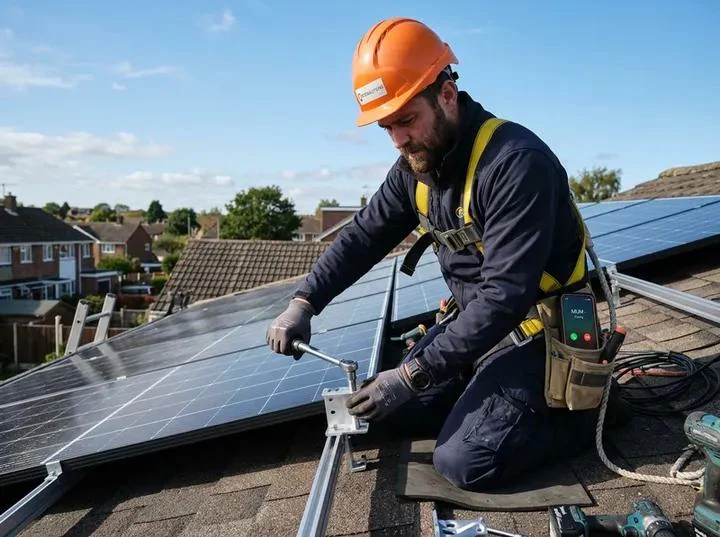
An AI call agent can answer incoming calls while the crew continues working. It can establish whether the caller is a homeowner, identify the type of solar enquiry, collect basic project details, and offer a site survey slot from your calendar. Calls that need a human decision can be transferred to an available sales representative.
The important distinction is that answering a call and completing a qualification are not the same as confirming a viable installation. Roof suitability, shading, structural concerns, utility requirements, and final system design still need the appropriate assessment.
The operational win is straightforward: the roof crew stays focused on safe installation work, while incoming leads receive a response. You do not need to interrupt a technician every time a prospective customer calls.
After-Hours Calls and Outage Spikes
Solar enquiries do not stop when the office closes. Homeowners may research installers in the evening, compare quotes over the weekend, or start looking for battery backup after a power outage.
Those calls can carry specific intent. Someone asking about backup power may want to understand whether a battery can support essential appliances, whether their existing solar system can accommodate storage, or whether an installation assessment is available. Leaving every after-hours enquiry in voicemail creates avoidable friction.
Set up dedicated after-hours and weekend call handling for these enquiries. The AI agent should be able to:
- Identify whether the caller needs new solar panels, battery storage, or an upgrade to an existing system.
- Ask what the homeowner wants to keep powered during an outage.
- Establish whether they already have solar installed.
- Capture the property location and preferred contact time.
- Book an available site survey or request a human callback, depending on the configured workflow.
The agent should not promise that a battery will power an entire property, provide an unsupported installation quote, or guarantee backup duration without the required system information.
Speed still matters, but the answer must also be accurate. A quick, confident answer that promises the wrong thing can create a more expensive problem than a delayed callback.
Unqualified Leads and Follow-Up Gaps
Not every person who calls is ready for a site survey. Some callers are renters without permission to make property changes. Others have a small electricity bill, live outside the service area, or want a product the installer does not offer. These enquiries are not necessarily worthless; they simply need to be identified before a sales representative spends time on a full consultation.
Without consistent qualification, one rep may book almost every caller while another rejects prospects too early. Follow-up also becomes inconsistent. A homeowner receives a callback but no confirmation, or a booked survey is never followed up with a reminder.
An AI call agent can standardize the initial questions and record the answers for the sales team. Depending on your business rules, it can flag:
- Service-area mismatch: The property is outside the installer's coverage.
- Property-status issue: The caller is renting or cannot confirm permission to install.
- Low or unclear energy usage: More information is needed before assessing commercial fit.
- Product mismatch: The caller needs a service the company does not provide.
- High intent: The homeowner is interested, meets initial criteria, and wants to arrange an assessment.
Do not automatically reject someone based on a single answer. A low utility bill may make a project less attractive, but only your business's actual qualification criteria can determine whether it should proceed. Likewise, roof orientation or shading cannot always be judged accurately during an initial phone call.
Use the same qualification questions across agents and human reps. Record the answers in the CRM, assign the next action, and set follow-up reminders. Send appointment confirmations and reminders through approved channels, with appropriate consent and opt-out controls.
The objective is not to eliminate every imperfect lead. It is to give your team a consistent way to prioritize the right enquiries and follow up on the rest. High lead-acquisition costs make this process worth measuring: better lead handling cannot guarantee a sale, but it gives the business a clearer way to manage the money already spent attracting prospects.
How the AI Call Agent Works Step by Step
An AI call agent should do more than answer the phone. It should move each enquiry toward a clear next step: a booked site survey, a warm transfer, or a documented follow-up. The questions, booking rules, CRM fields, and escalation paths should all be configured around your sales process.
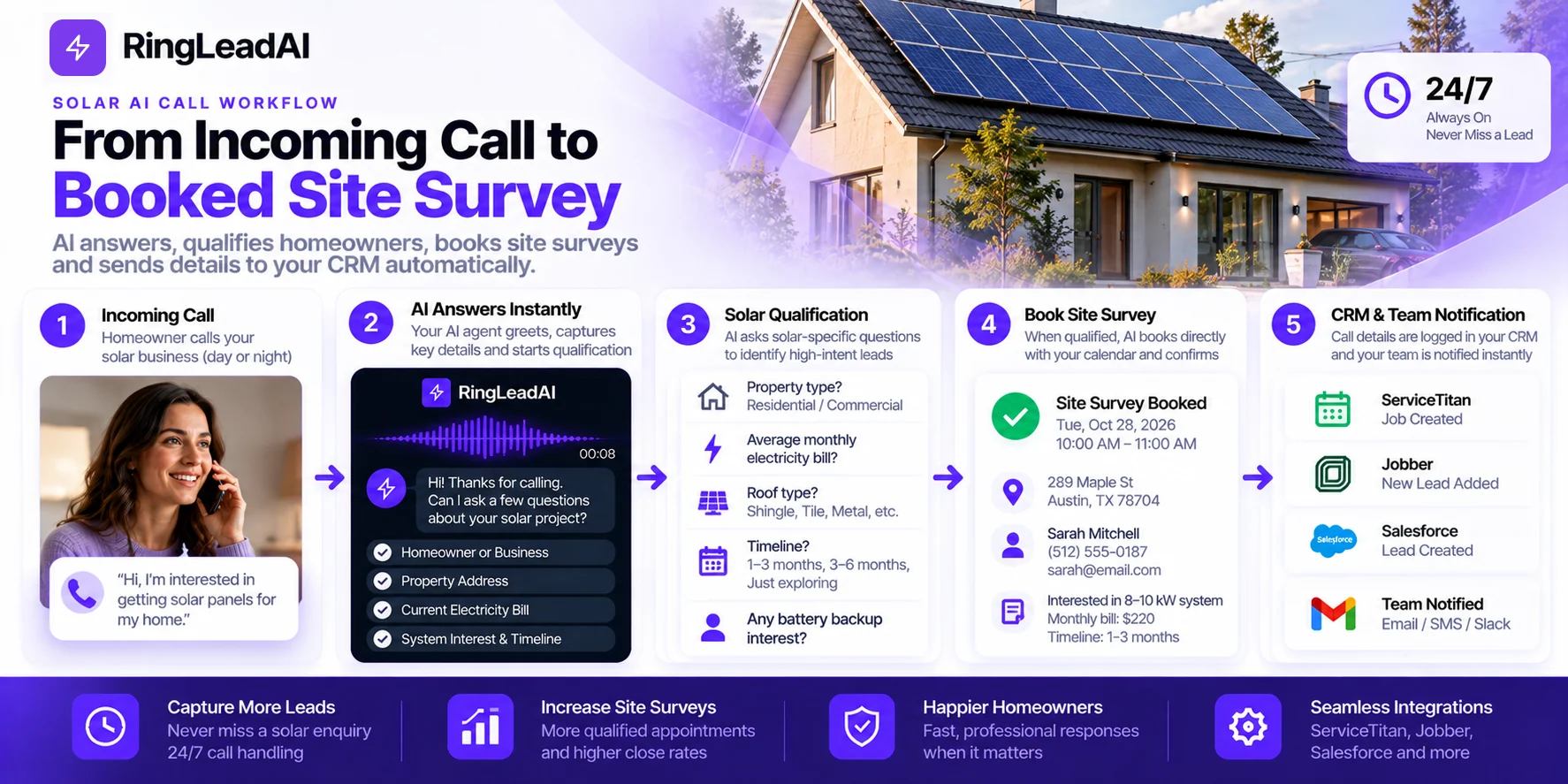
1. Instant Answer and Lead Capture
When a homeowner calls, the AI answers and explains how it can help. It captures the caller's name, callback number, and reason for calling, then identifies whether the enquiry concerns a new solar installation, battery storage, an existing system, or another service.
No hold music. No voicemail as the default response. No need for the installer on the roof to stop work just to collect a phone number.
The first job is to capture the lead accurately. If the caller's number or address is unclear, the AI should confirm it rather than silently saving incorrect details.
2. Solar-Specific Qualification
Generic call scripts miss the details that matter to solar installers. Depending on your rules, the agent asks about property ownership, roof direction, shading, condition and material, the average monthly utility bill and provider, battery interest and essential circuits, budget or financing preference, and timeline.
Keep the conversation natural. Ask one question at a time. If a homeowner does not know their roof orientation, the AI should record that as unknown rather than guessing.
Give the agent your approved company information through its knowledge base — products, financing terms, local requirements. Tax credits and incentives must be checked against current official guidance, and permitting timelines presented as estimates only when supported by local information.
3. Appointment Booking and Calendar Sync
RingLeadAI books through Cal.com, which syncs with Google Calendar and Microsoft Outlook: the agent checks availability, offers suitable slots, and confirms the homeowner's choice while they are on the line.
Before enabling booking, define which areas and property types qualify, how long each survey takes, which surveyors cover each territory, and the travel buffers or blackout periods required.
The agent should confirm the date, time, property address, and contact number before ending the call — and if a booking fails, record the request for human follow-up instead of claiming the survey is booked.
4. Warm Transfer with Conversation Context
Some callers need a person immediately — to compare financing options, discuss a complex battery configuration, or simply because they prefer a representative.
In a warm transfer, the agent holds the caller, briefs your rep on the name, project type, location, electricity usage, battery interest, timeline, and reason for escalation, then connects both. The rep can pick up mid-conversation instead of asking the homeowner to repeat everything.
Define explicit transfer triggers: a high-intent homeowner asking for a person, a question outside the approved knowledge base, a complaint, or a complex system requirement. If nobody answers, the agent takes a message and texts the details to your team member.
5. CRM Logging and Follow-Up Automation
Every call's recording, transcript, and summary lands in the Call Library, and leads sync natively to HubSpot, Salesforce, Pipedrive, or Close. Other systems — ServiceTitan among them — connect through the agent's API request tool or through webhooks and Zapier.
Agree on a consistent set of call outcomes and use them in reporting: survey booked, warm transfer completed, qualified — callback required, more information required, outside service area, existing-customer support, not interested, follow-up requested.
Test the complete workflow before going live: make test calls, verify the CRM records, check calendar availability, and confirm that failed transfers or incomplete bookings create a visible follow-up task.
6. Transparent AI Limits and Escalation
An AI call agent should not pretend to be a licensed designer, electrician, financial adviser, or permitting specialist. Escalate when a caller asks for a complex custom design or a definitive performance estimate; the question involves electrical safety or an existing-system fault; a caller complains or becomes upset; a homeowner asks for a person; or the answer depends on incentive eligibility, a financing agreement, or a local permitting decision.
Be transparent about the use of AI — RingLeadAI's AI and recording announcement opens each call — and follow applicable recording, privacy, consent, and telemarketing requirements. Do not assume that an inbound enquiry grants blanket permission for future automated marketing calls or texts.
Solar-Specific Qualification Criteria
The best qualification script is not the longest one. It collects the information needed to decide the next action without turning a first call into a full technical consultation.
- Homeownership and property fit: Confirm whether the caller owns the property or is authorized to approve a solar installation, and take the address to check coverage. Renters should not be automatically dismissed if they have a route to landlord approval or are asking about another service.
- Roof orientation and condition: Ask what the homeowner knows about the roof's direction, age, shading, material, and condition. A tile roof is not automatically unsuitable, and unknown answers should be marked clearly for the surveyor. Flag concerns — don't reject projects on incomplete information.
- Utility bill size and usage: Ask for the average monthly bill and the utility provider. This helps the sales team prepare, but it cannot by itself guarantee savings or determine system size; tariffs, usage patterns, roof conditions, design, and export arrangements all matter.
- Battery interest and outage readiness: Ask whether the homeowner wants storage, already has solar, or is mainly concerned about outages — and which appliances or circuits matter. Route existing-system faults or safety concerns to support rather than treating them as sales leads.
- Budget and financing readiness: Ask about budget range, cash or financing preference, and target timeline, neutrally and without pressure. The purpose is to understand the buying process, not to make a credit decision or guarantee financing approval.
Use Cases by Call Type
A solar company does not receive one type of call. The agent should identify the caller's intent first, then follow the right workflow: book a site survey, route the call, or create a follow-up task.
- New installation leads: The agent collects property location, ownership, electricity usage, known roof details, battery interest, and timeline; books an eligible survey; and warm-transfers callers ready to move forward. Track the share of these calls that become qualified leads and booked surveys.
- Service and repair calls: Inverter faults, performance concerns, warranty questions, and urgent repairs need their own path. The agent collects the system location and issue and transfers by urgency — it should never diagnose electrical faults or suggest risky repairs.
- After-hours battery backup inquiries: The agent asks whether the property already has solar, identifies backup priorities and urgency, then books a survey or transfers to on-call. It should not promise capacity, backup duration, or compatibility.
- General pricing and financing questions: The agent answers from your approved information — financing options, incentive information, the general project process — and passes custom quotes, financial advice, or technical decisions to a person with the question attached.
CRM and Calendar Integrations
The AI call agent becomes more useful when it connects to the systems your team already uses. Without those connections, staff still copy call notes, create contacts, schedule surveys, and chase incomplete records manually.
What connects in RingLeadAI today:
- CRM: native sync with HubSpot, Salesforce, Pipedrive, and Close.
- Calendar: Cal.com booking during the call, syncing Google Calendar or Outlook.
- Everything else: the API request tool calls any REST API during the call, and signed webhooks, Zapier, and Slack carry each call onward afterwards.
For example, a new solar enquiry could create a lead record with the caller's name, phone number, and property location; lead source and enquiry type; ownership status and qualification answers; battery interest and timeline; call outcome, assigned rep, and next action; and the site survey status and appointment, if booked. Before implementation, test duplicate handling, failed syncs, field mapping, and ownership of follow-up tasks.
Solar Proposal and Pre-Feasibility Tools
Solar design and proposal platforms such as Aurora Solar, OpenSolar, and solarVis help the sales team move from an initial enquiry to a more informed assessment. The AI agent can collect what these tools need — the property address, electricity usage, roof details known to the homeowner, and battery interest — so the designer starts with clean data.
That does not mean the AI can independently produce a reliable engineering design or confirm installation feasibility. Roof condition, shading, structural suitability, and electrical requirements still need professional assessment. The practical objective is to reduce repetitive data collection and give the designer or sales rep a better starting point.
Lead Source Integrations
Leads arrive through paid social campaigns, website forms, referral partners, and search campaigns. If each source feeds a different inbox, response times and follow-up quality vary. Routing sources such as Facebook Lead Ads or form tools into your CRM — Zapier is the usual bridge — centralizes them. Capture the original source and campaign so managers can compare qualification rates, booked and completed surveys, and sales by source.
Call Tracking and Analytics
Call tracking answers the question that matters: are you recovering valuable opportunities, or simply answering more calls? At minimum, report on:
- Speed-to-lead: Time between an enquiry and the first response.
- Answer rate: The share of incoming calls answered by the system or team.
- Qualification rate: The share of enquiries meeting your initial criteria.
- Survey booking rate: The share of qualified leads that book an appointment.
- Survey completion rate: The share of booked appointments that take place.
- Lead-to-sale rate: The share of leads that ultimately become customers.
Segment these figures by lead source, call type, time of day, and new versus existing customer. Before going live, test each call path end to end: a new installation lead reaches sales, a service fault reaches support, a completed booking appears in the correct calendar, and a failed transfer generates a clear next action.
Compliance and Security
An AI call agent should make lead handling more consistent without creating new legal or data-security risks. A vendor's claim that its product is “compliant” does not remove the installer's responsibility to configure and use it correctly.
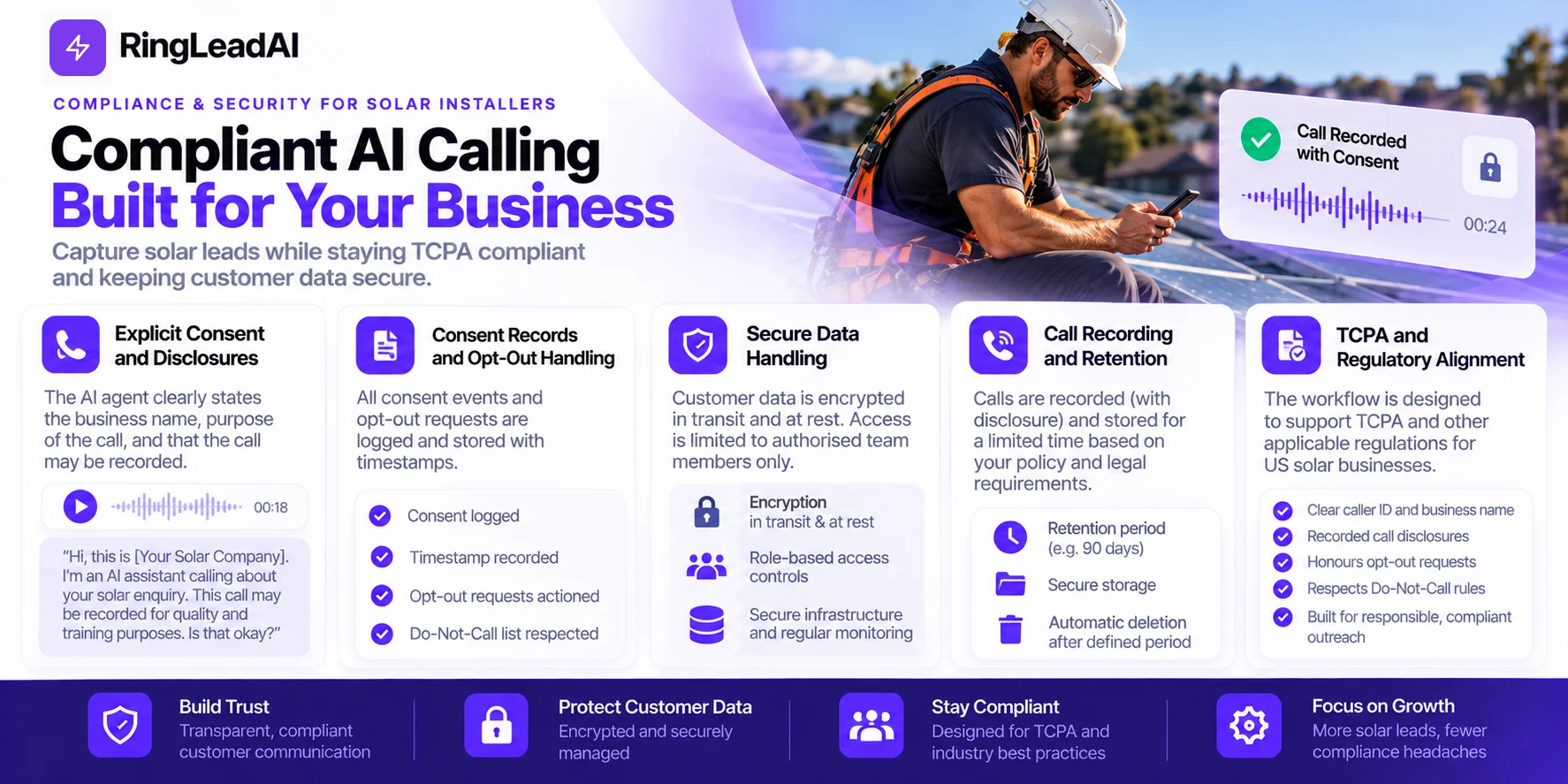
TCPA and Consent Management
For US solar businesses, automated calling and texting workflows need to account for the Telephone Consumer Protection Act (TCPA), applicable Federal Communications Commission (FCC) rules, and relevant state laws. An inbound enquiry does not automatically authorize every future automated marketing call or text. Build consent management into the workflow:
- Capture the consent language presented to the homeowner and the action they took.
- Record the source, timestamp, and scope of consent where applicable.
- Maintain suppression lists and honor opt-out requests — RingLeadAI keeps a Do-Not-Call list for outbound campaigns.
- Separate sales follow-up permissions from other communications where required.
- Review state-specific rules with qualified legal counsel before launch.
Recording Disclosures
If calls are recorded or transcribed, determine which disclosures and consent procedures apply to the states and callers involved. Where required, the disclosure must come before recording begins: turn on the agent's AI and recording announcement, which plays before your greeting. Document how consent is captured and what happens if a caller declines, and make sure the team knows how to handle requests to access or delete information.
Do not assume that a recording disclosure automatically satisfies every consent requirement for automated marketing calls.
Security Certifications and Data Handling
Solar enquiries can contain names, phone numbers, property addresses, electricity bills, financing preferences, and call recordings. Treat this information as customer data that needs protection. When evaluating any AI call agent, ask the vendor:
- Does it hold a current SOC 2 report or another independently verified security certification?
- Is data encrypted in transit and at rest?
- Who can access recordings, transcripts, and lead records?
- How long is information retained, and can retention periods be configured?
- Which subprocessors receive customer data? (RingLeadAI publishes its sub-processor list.)
- Can access be restricted by role, and are access events logged?
Verify certifications and security claims directly with the vendor. TCPA is a legal framework, not a security certification or compliance badge, and encryption alone does not establish that a platform meets all your legal and security requirements.
ROI: What Installers Can Recover
An AI call agent should earn its place in your solar operation. Faster answers are useful, but the business case depends on what happens next: more qualified leads, more completed site surveys, and more installations without a proportional increase in sales overhead. Start with your own lead volume, close rate, gross margin, and current response time, then compare them with the results after implementation.
Using the example above — $22,000 × 20% = $4,400 gross profit per contract, and $4,400 × 18% = $792 per lead — each lead represents approximately $792 in expected gross profit, assuming the 18% close rate applies to the leads being measured. This is expected value, not guaranteed revenue: some homeowners will call back, some will choose another installer, and some were never going to qualify.
Responding first does not guarantee the contract, either. Measure the relationship between response time and outcomes in your own CRM — compare leads contacted within five minutes with leads contacted later, accounting for lead source, qualification, and time of day — and track weekly:
- Median and average response time.
- Percentage of leads reached.
- Qualification rate.
- Site surveys booked and completed.
- Lead-to-sale close rate.
- Cost per completed survey and cost per acquired customer.
Once you have a documented baseline and enough post-launch data, that before-and-after comparison is your own case study.
Call Type Handling Matrix
How the agent can handle different solar call types — what it asks, what it checks, and what happens next. Adapt the questions and routing rules to your sales process, service coverage, and CRM statuses.
| Call type | Common questions | Qualification checks | Next step |
|---|---|---|---|
| New installation lead | Do you own the property? What is your average electricity bill? Are you interested in battery storage? | Property authority, service area, known roof conditions, energy usage, timeline | Book an eligible site survey or warm-transfer a high-intent caller |
| Service or repair | Is your inverter showing a fault? Is the system under warranty? Is there a current outage or safety concern? | Existing system, location, issue, urgency, warranty details if known | Transfer to the service team or log for technician follow-up |
| After-hours battery backup | Is the power out now? Do you already have solar? Which appliances need backup? | Outage status, existing system, backup priorities, location | Book a survey or transfer urgent issues to on-call |
| Pricing or financing | What does solar cost? What financing options are available? Which incentives might apply? | Property location, project scope, timeline, budget or financing preference | Give approved information, then book a consultation or escalate complex questions |
| Missed-call follow-up | Were you enquiring about a new installation, battery storage, or an existing system? When would you prefer a callback? | Caller intent, existing CRM record, contact permissions, preferred contact time | Log the outcome and create an authorized callback or follow-up task |
The matrix is a starting point, not a universal routing specification. The goal is to make each call outcome explicit: every enquiry should end with a documented next action — a booked survey, a completed warm transfer, a service escalation, or a follow-up task.
Missed-Call ROI Calculator
One unanswered solar enquiry can represent hundreds of dollars in expected gross profit. Use this calculator to estimate what missed calls may be costing your business each month — and how much value faster response could recover.
The calculator separates the estimated value of missed opportunities from the portion an AI call agent might recover. The annual figure multiplies the monthly estimate by 12. Replace the example inputs with your CRM data before making a purchasing decision.
Calculate Your Missed-Call Cost
Enter your own numbers. The defaults are the example from this guide.
Estimated impact
- Gross profit per sale
- $4,400
- Expected gross profit per lead
- $792
- Monthly missed-call value
- $15,840
- Annual missed-call value
- $190,080
- Projected monthly recovery
- $7,920
An estimate, not a guarantee. Results depend on your prices, margins, close rate, lead quality, and how many missed callers would otherwise have become customers.
Sample AI Call Transcript and Objection Handling
An AI call agent should answer common questions clearly without pretending to be a solar designer, tax adviser, or permitting expert. The sample below shows how it could handle typical objections while collecting qualification answers.
Sample Conversation: HOA and Tile Roof Objections
“My roof is tile, and my HOA has strict rules. Can I still get solar?”
“It may be possible, but the roof and HOA requirements need to be checked before anyone can confirm. I can collect a few details so the solar team can assess the next step. Do you own the property, and has your HOA provided any solar installation guidelines?”
“I own it, but I haven't checked the HOA rules. Also, will solar make my electric bill zero?”
“I can't promise a zero bill. Your result depends on your electricity use, system design, utility rates, and applicable export or net-metering rules. I'll note the tile roof and HOA question for the team. How much is your typical monthly electricity bill, and are you interested in battery backup?”
“Usually around $250. I'm interested in batteries, too. How long does permission to operate take?”
“The timeline varies by utility, project, and inspection requirements, so I wouldn't want to give you an inaccurate date. I'll flag that question for the solar team. Would you like me to check availability for a site survey?”
This is an illustrative script, not a recording of a real customer call. Actual answers, booking actions, and transfers depend on the agent's configuration and connected integrations.
Objection and Qualification Script Library
Use a consistent script as a starting point, then adapt it to your service area, installation process, and approved company guidance.
| Topic | Suggested question or response |
|---|---|
| Homeownership | “Do you own the property or have permission to make installation decisions?” |
| Roof orientation and condition | “Do you know which direction the roof faces, and is there any known damage or recent roof work?” |
| Electricity usage | “What is your typical monthly electricity bill, or your approximate monthly usage if you know it?” |
| Battery interest | “Are you mainly looking to reduce electricity costs, prepare for outages, or both?” |
| Financing readiness | “Would you prefer to discuss a cash purchase, financing, or available options with a specialist?” |
| HOA rules | “Do you have HOA guidelines for solar? The team can confirm the applicable requirements.” |
| Tile roof | “Tile roofs may need a specific installation assessment. The installer should confirm suitability and any additional work.” |
| Permission to operate | “The timing depends on the utility and project requirements. I can record your question for the team.” |
| Zero-bill expectation | “I can't guarantee a zero bill. The team needs to review your usage, system design, utility rates, and applicable rules.” |
Protect the Lead and the Roof Crew
Your roof crew should focus on safe installations — not answer calls while working at height. An AI call agent can capture incoming enquiries, collect qualification answers, book site surveys, and route complex questions to the right person.
Start with your own missed-call data. Measure answer rates, qualified leads, completed surveys, and installations before and after launch. That is how you determine whether the system creates real business value: fewer missed opportunities, a more consistent lead-handling process, and measurable results — without compromising roof-crew safety or making promises your team cannot keep.