Stop Losing Landscaping Leads to Missed Calls

Spring is one of the busiest periods for landscaping companies. Homeowners request weekly mowing, spring cleanups, mulch installation, lawn treatments, patio estimates, and complete renovations — while crews are working outdoors, estimates are being prepared, and existing customers need attention.
When a new lead calls and nobody answers, that opportunity can disappear. The caller may contact another landscaping company before you finish the job you're working on.
An AI call agent helps handle incoming calls, collect essential property details, qualify requests, and book estimate appointments according to your business rules. It doesn't replace your expertise: it doesn't price a custom patio, design-build project, or complex irrigation installation. It gathers the information your team needs to decide what happens next.
Why Missed Calls Cost Landscaping Businesses Money
A missed call may be a recurring mowing customer, a spring cleanup, a profitable installation estimate, or a commercial maintenance contract — and the problem is sharpest during spring rush, when crews move between properties and the office is juggling several enquiries at once.
- You miss potential recurring customers. A homeowner looking for weekly maintenance may become a customer for the whole season; if they reach a competitor first, you lose the first job and the repeat visits. Calculate the value with your own prices, visit frequency, season length, and retention.
- Your crew can't stop work to answer every call. It's hard to answer while operating equipment, supervising a crew, meeting a customer, or driving — and many callers won't leave a voicemail.
- High-value projects need proper screening. A patio, retaining wall, drainage improvement, or redesign needs location, scope, access, and the customer's goals before an on-site assessment. The agent gathers these details; it never invents a project price or promises a job is suitable.
- Delayed follow-up creates more admin. A missed call turns into several tasks — calling back, asking for the address, confirming the service, checking availability. Collecting it all in the first conversation cuts the back-and-forth.
Calculate the Potential Value of Missed Calls
Estimate how much additional revenue could be associated with answering more qualified calls. This is a planning exercise, not a revenue guarantee — the defaults are the document's worked example (100 relevant calls, 25 missed, 20% won after follow-up, $300 per customer = $1,500), not industry benchmarks.
Potential additional revenue = Missed qualified calls × Expected conversion rate × Revenue per acquired customer
After launch, track the actual results: answered calls, qualified leads, booked estimates, new customers, and revenue against your previous baseline.
Missed-Call Value Calculator
Example values — replace them with your own figures.
Estimated impact
- Missed calls
- 25 / mo
- Potential new customers
- 5 / mo
- Potential additional revenue
- $1,500 / mo
- After AI cost
- $1,451 / mo
Illustrative, not a revenue guarantee: it ignores operating costs, cancellations, crew capacity, and customers who would have booked anyway.
How an AI Call Agent Works in Three Steps
Step 1: Answer and qualify the caller
An inbound agent answers on its own number with your approved greeting and asks what the customer needs. It collects only what's relevant to the service requested: name and callback number, property address and ZIP code, the service (mowing, cleanup, mulching, hardscaping), approximate lawn or project size, access details such as gates, pets, or parking, and preferred timing.
Step 2: Apply your service and pricing rules
It checks the answers against the rules in its prompt and knowledge base: service boundaries, minimum jobs, supported services, seasonal availability, and appointment types.
For routine services it can share approved, current published rates; for custom work it explains that the team needs to assess the project first. Weekly mowing needs the address, lawn size, gate access, and frequency — a new stone patio needs a site assessment, not an AI-generated total.
Step 3: Book, route, or record the next action
Depending on your setup, it books an estimate on your calendar through Cal.com, transfers the call to a team member, texts a confirmation, or flags an urgent request. Every call's recording, transcript, and summary lands in the Call Library, and leads sync to your CRM.
It confirms appointment details clearly and never promises a time that hasn't been verified.
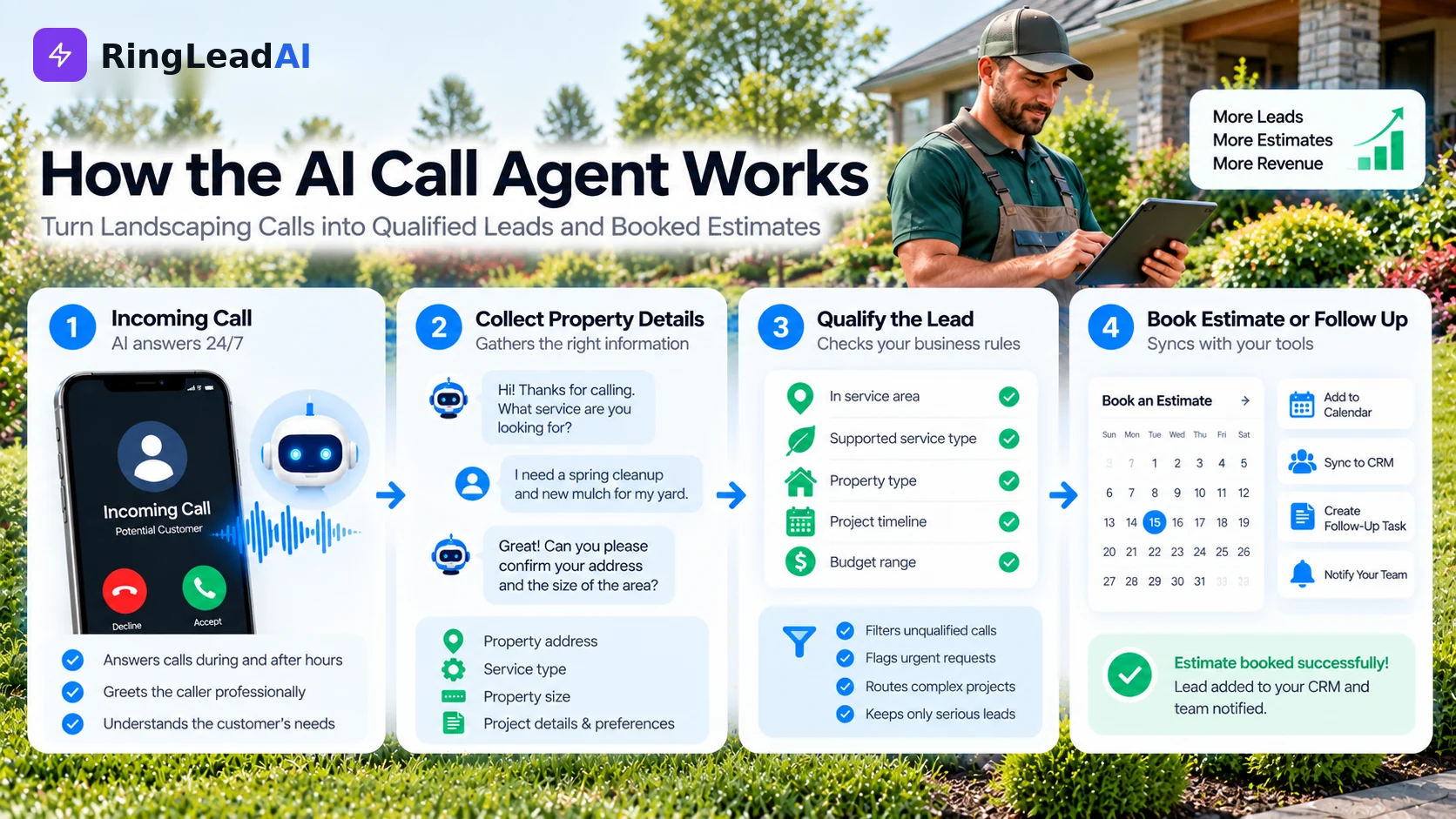
Landscaping Call Scenarios an AI Agent Can Handle
- Weekly mowing and lawn maintenance: the agent collects the address, lawn size, frequency, gate access, and preferred service days, checks your service area, and arranges the next step under your scheduling rules.
- Patio and hardscaping estimates: it asks about location, project type, approximate dimensions, desired materials, access, and timeframe, and books an estimate if the project fits — never a custom total, since materials, excavation, drainage, site conditions, design, and labour all affect the price.
- Spring cleanups and mulch: it clarifies the work — leaf removal, bed preparation, edging, mulch — plus location, area, debris, and timing, then books an estimate or passes the details on.
- Commercial and HOA maintenance: it collects the organisation, property, contacts, scope, size, and bidding requirements; contracts, compliance documents, and complex sites go to the responsible person.
- Irrigation problems and urgent requests: it records the problem and location, asks whether water is still running, and follows your escalation procedure — no diagnosis, and no emergency-response promise unless you offer one.
- Quote follow-ups and seasonal reminders: with the customer's permission, workflows and voice campaigns can follow up on open quotes or remind last season's customers — with calling hours and a Do-Not-Call list applied, and an easy opt-out.
- Spanish-language enquiries: each agent speaks one language, chosen from 16 — Spanish included. Run a Spanish-speaking agent on its own number, and test its service vocabulary, address capture, and transfer before advertising it.
Integrations and Setup: Make the Agent Fit Your Operation
An AI call agent is only useful when its actions match your existing process. What connects in RingLeadAI today:
- Calendar and scheduling: Cal.com booking during the call, syncing Google Calendar or Outlook.
- CRM: native sync with HubSpot, Salesforce, Pipedrive, and Close.
- Field-service software: no ready-made connector — reach it through webhooks, Zapier, or the agent's API request tool where your platform allows.
- Phone: an inbound agent on its own number, with call forwarding for after-hours or overflow and transfers to your team.
- Messaging: confirmation texts sent during the call.
- Reporting: the Call Library's recordings, transcripts, and summaries for every call (call analytics come with the Pro and Scale plans).
A Practical Setup Checklist
- Service list: what you offer and what you don't accept.
- Service boundaries: towns, ZIP codes, travel limits, excluded areas.
- Qualification rules for mowing, cleanup, commercial work, and installation estimates.
- Pricing policy: only approved rates, and when a site visit is required.
- Calendar rules: estimate slots, working hours, travel buffers, unavailable periods.
- Transfer rules for urgent calls, complaints, complex projects, and requests for a human.
- Approved wording for confirmations, reminders, and follow-ups.
- Privacy and recording: notices, consent, data access, and retention.
- Realistic test calls before directing all leads to the agent.
- A team member assigned to review call summaries and fix recurring problems.
Start with a limited set of common call types and expand once you've checked the results.
Hear It Work: Example Landscaping Call Transcripts
These are illustrative examples of how a well-configured agent might handle common enquiries — not recordings of real customers.
Example 1: Weekly lawn mowing
“Thanks for calling Green Valley Landscaping. How can I help you today?”
“I need someone to mow my lawn every week. It's 125 Oak Street — around half an acre, with a gate at the back.”
“Thank you. Are you looking for weekly service throughout the mowing season?”
“Yes, if you have availability.”
“I'll record those details and check the next step on the service schedule. May I confirm your name and best callback number?”
The agent identifies the recurring service, collects the property information, and checks availability — without promising the company can take the job.
Example 2: Custom patio estimate
“I want a new paver patio in my backyard — about 400 square feet, concrete pavers, maybe a small seating wall.”
“I'll include those details. The team will need to assess the site and project before providing a price. Would you like me to check the available estimate appointments?”
It captures the requirements and moves the caller toward an estimate — no invented patio price, no implied approval of the scope.
Pricing, Call Volume, and Plan Selection
Choose a plan from your expected peak-season call volume and minutes, not the headline price alone.
| What to check | RingLeadAI today |
|---|---|
| Subscription and included minutes | Voice Starter $49/mo (200 voice minutes), Voice Pro $199/mo (1,000 voice minutes), Voice Scale $499/mo (3,000 voice minutes) |
| Peak-season capacity | Parallel calls up to each agent's concurrency setting, within your plan's minutes |
| Phone numbers and transfers | Phone numbers included per plan; transfers to your team |
| Integrations | Cal.com and native CRMs; webhooks, Zapier, and the API request tool for the rest |
| Recordings and transcripts | Every call, in the Call Library |
| Terms | 7-day free trial, no credit card, cancel anytime |
Current plans and terms are always on the pricing page. To compare costs, multiply the hours your team spends answering, returning, and qualifying calls by the relevant hourly cost, then allow for setup, oversight, and calls that still need a person — a workload comparison, not proof of savings.
Proof It Works: Measure Landscaping Results
Evaluate the agent with your own data. Record a baseline before launch, then compare a consistent period — especially during spring rush, when volume changes.
| Metric | What it tells you |
|---|---|
| Call answer rate | The share of incoming calls that get an answer |
| Lead response time | How fast you respond when a caller can't be handled immediately |
| Qualified leads | Callers meeting your service-area and job requirements |
| Estimate bookings and show rate | Suitable enquiries that become estimates — and take place |
| Close rate and recurring accounts | Estimates that become paying and repeat customers |
| Out-of-area enquiries | Unsuitable requests caught before they take staff time |
| Revenue and gross margin | Results after delivery costs |
Common Objections and Practical Answers
- “My customers want to talk to a real person.” Some will, especially for complex projects or complaints. Set the agent to transfer or book a callback, and make the handoff clear.
- “Will it give the wrong price?” It shouldn't generate custom totals. Give it only approved pricing and clear rules for when a site assessment is required, then test pricing questions and review transcripts.
- “Can it handle our spring rush?” Calls are answered in parallel up to each agent's concurrency setting, within your plan's minutes — test under realistic volume before relying on it.
- “Can it book jobs around our routes?” Only as far as your calendar and rules allow. An estimate appointment isn't a confirmed work order; route density, crew assignment, weather, and job duration need to be reflected in the rules or reviewed by a person.
- “What about emergencies and complaints?” Write a defined escalation process. The agent collects the details and routes the call — no diagnosis, no promised arrival time, no complaint dismissed without human review.
- “Is it legal to use an AI voice?” It depends on the call type, technology, consent, and federal and state law. The FCC ruled on February 8, 2024 that AI-generated voices fall within the TCPA's restrictions on artificial or prerecorded voices — review consent before outbound calls, plus recording, privacy, do-not-call, and texting rules, with legal advice for your setup.
AI Call Agent vs. Part-Time Receptionist vs. Answering Service
| Option | Main strengths | Limitations | Best fit |
|---|---|---|---|
| AI call agent | Follows a defined script, collects details, covers after hours | Needs setup, monitoring, and clear escalation rules | Repetitive enquiries and structured qualification |
| Part-time receptionist | Human judgement, personal service, direct coordination | Limited to scheduled hours; workload affects capacity | Businesses needing regular office support |
| Human answering service | Live interaction and message-taking | May not know landscaping detail or have calendar access | Businesses prioritising human call handling |
| Voicemail | Simple and usually inexpensive | Callers must leave a message; staff must follow up | Very low call volumes or backup |
An AI agent can complement a receptionist or answering service: AI for routine first enquiries, people for complex, sensitive, or high-value conversations.
Answer More Calls Without Losing Control of Your Pricing
While crews are mowing, mulching, and finishing projects, new customers are still calling. Start with your most common call types — weekly mowing, spring cleanup, and estimate requests. Define your service area, questions, pricing boundaries, scheduling rules, and escalation process; test before relying on it; then measure against your existing process.
The goal isn't to automate every conversation. It's to stop avoidable missed opportunities while your team stays in control of estimates, scheduling, and customer relationships.