When the Phone Rings at 11:14 p.m.
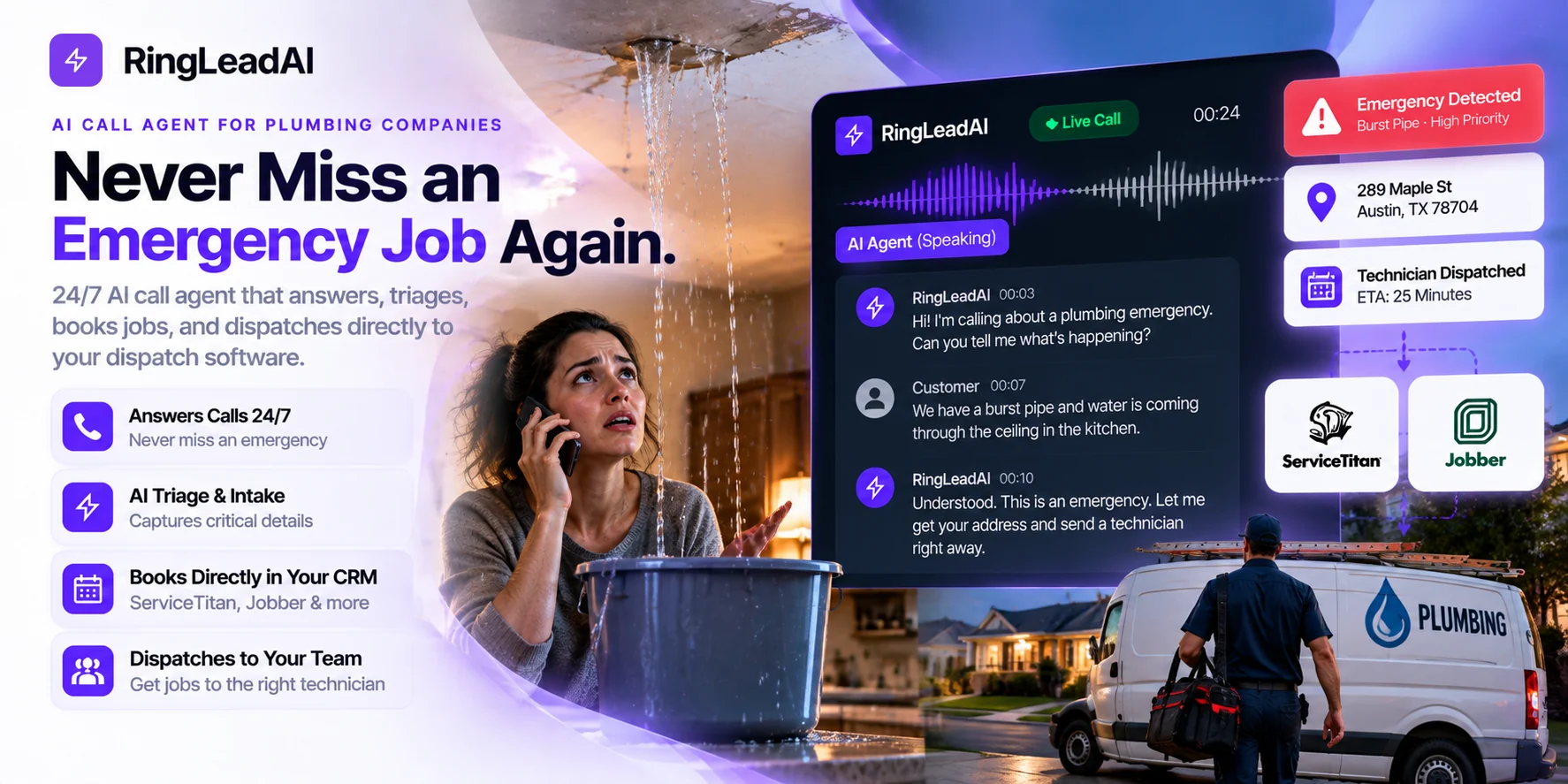
At 11:14 p.m., a homeowner stands in their kitchen watching water pour through the ceiling. They panic, search for a 24/7 plumber on Google, and hit call.
The phone rings four times. Voicemail.
They immediately hang up and call the next listing. That high-ticket emergency job is gone before your on-call technician's phone even vibrates.
For plumbing companies running anywhere from 1 to 50 trucks, missed calls aren't just an administrative oversight — they are direct leaks in your revenue pipeline. When a pipe bursts, homeowners rarely leave voicemails; they hire the first professional who picks up the phone and confirms an ETA.
An AI call agent gives plumbing contractors an automated, intelligent frontline. It answers straight away, screens emergencies from routine drain cleanings, captures field-ready intake details, and books the job or hands your dispatcher a clean record — whether your office is overwhelmed during the morning rush or closed for the night.
The Missed-Call Bottleneck: What Voicemail Actually Costs Your Business
A missed call is an immediate zero-dollar quote.
Vendor marketing often throws around generic claims about how much incoming volume contractors lose. You don't need generalized industry averages to see the leak. You only need to look at your own phone logs during two high-risk windows:
- Peak Dispatch Hours (7:30 AM – 10:00 AM): Your office staff is juggling dispatching trucks, collecting payments, and managing tech queries while multiple lines ring at once.
- After-Hours & Weekends: Your on-call rotation is asleep, driving, or already tied up on another job site.
Measure Your True Revenue Baseline
Before investing in any automated answering system, run an audit on your last 60 days using these four core metrics:
- True Missed-Call Rate: Unanswered unique inbound calls divided by total unique calls (filter out internal calls and known vendors).
- Voicemail Drop-Off Rate: Percentage of after-hours callers who reach your voicemail and disconnect without speaking.
- Emergency Conversion Rate: Percentage of answered emergency inquiries that translate into a dispatched truck.
- Average Ticket Value (Emergency vs. Standard): Differentiating between a scheduled fixture replacement and an overtime emergency drain clearing or burst-pipe repair.
The Real Cost Breakdown (Scenario Example)
Consider a mid-sized plumbing shop running 6 to 8 trucks. The inputs are assumptions — replace them with the numbers from your own audit:
| Metric | Conservative Estimate |
|---|---|
| Weekly Missed Calls (After-Hours + Peak Overflow) | 20 calls |
| Qualified Emergency/Immediate Job Inquiries (50%) | 10 qualified leads |
| Realistic Booking Conversion Rate (38%) | ~3.8 booked jobs/week |
| Average Emergency Ticket Value | $450 |
| Weekly Recovered Revenue | $1,710 |
| Annual Top-Line Impact (52 Weeks) | ~$88,920 |
Even accounting for non-serviceable locations and price shoppers, reclaiming just 3 to 4 emergency jobs each week fundamentally shifts your annual gross margin.
The Three Hidden Call Leaks Draining Plumbing Revenue
Contractors rarely lose revenue from a lack of demand; they lose it at the phone line. In a high-volume service business, call leakage typically clusters around three failure points.
1. After-Hours and Weekend Emergencies
Burst pipes, sewer backups, and failed water heaters don't align with business hours. When a homeowner with four inches of water in their basement reaches voicemail, they rarely leave a message. They hang up and tap the next sponsored local result on their phone. An AI call agent secures these high-margin after-hours jobs instantly: it greets the caller, logs the exact issue, and follows your emergency rules — transferring to your on-call tech or texting them the details — without forcing a stressed homeowner to wait until 8:00 AM.
2. Peak Daytime Overflow
Even staffed dispatch desks face bottleneck periods. During peak morning hours (7:30 AM – 10:00 AM), dispatchers are often simultaneously confirming truck routes, handling technician check-ins, processing credit cards, and answering the primary line. When lines are busy, hold times climb, and abandoned calls spike. An AI voice agent acts as overflow insurance: it picks up parallel incoming calls (up to the concurrency you set for the agent), logs routine requests, and leaves clean booking records so dispatchers can focus on high-priority exceptions.
3. Incomplete Intake and Dispatch Friction
Answering the call is only half the battle; capturing messy or partial information creates downstream operational chaos. Rushed staff or distracted answering services often miss critical operational details, forcing dispatchers to make repeat phone calls to confirm basic facts.
A disciplined intake eliminates phone tag, prevents technicians from arriving with the wrong equipment, and ensures billable hours are spent turning wrenches, not hunting down entry codes.
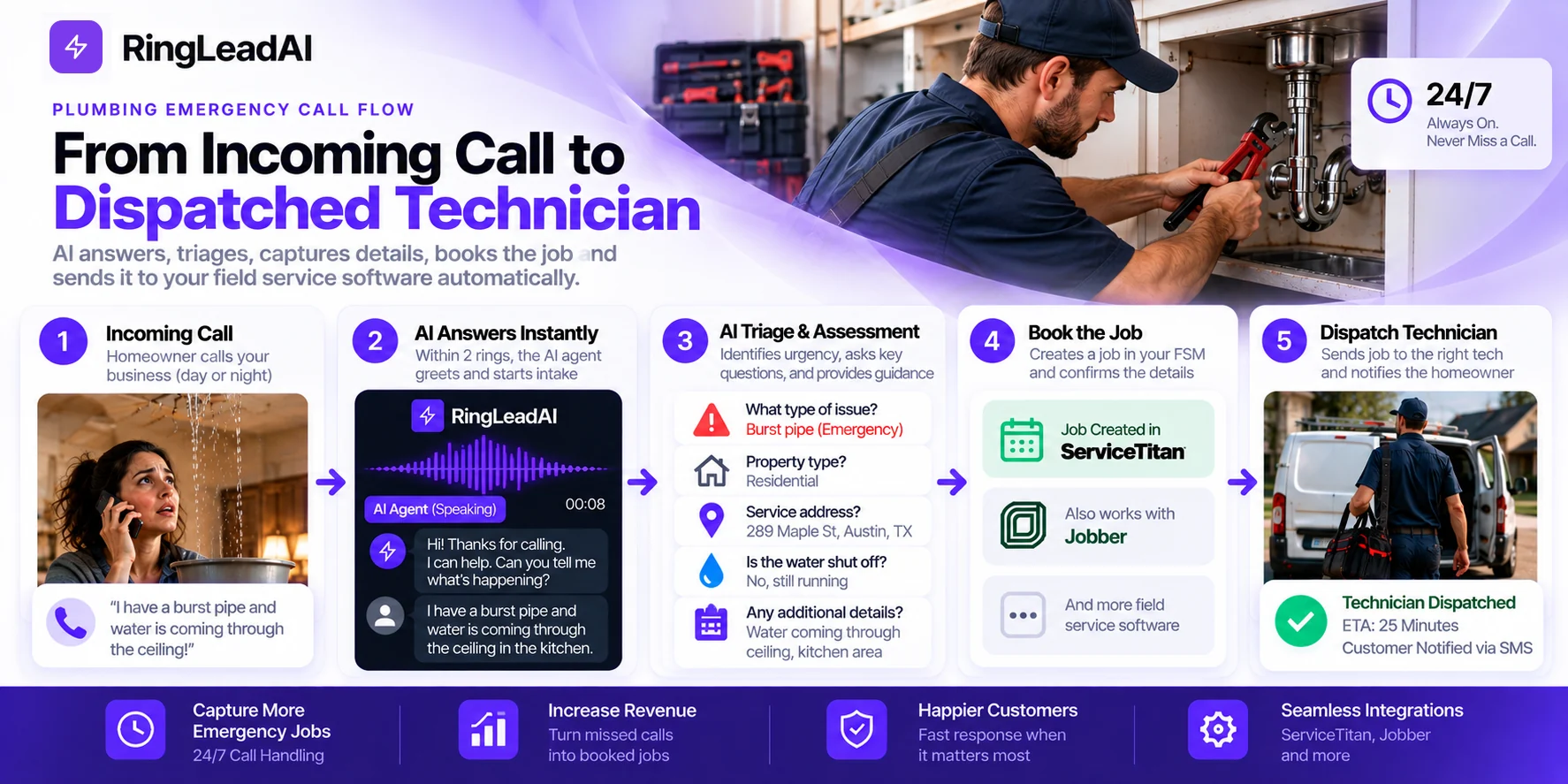
The AI Call Flow: Step-by-Step Architecture
A reliable AI call agent doesn't sound like a generic robotic menu. It executes a deterministic, safety-first intake protocol built around standard plumbing dispatch operations.
Step 1: Immediate, Frictionless Greeting
The agent answers the moment the call reaches it, removing the friction of touch-tone IVR menus (“Press 1 for Dispatch”).
Production greeting: “Thank you for calling [Company Name], serving [Primary Metro Area]. How can we help you with your plumbing today?”
Keep greetings under 10 seconds. In emergency situations, callers are in a heightened state of stress; verbose automated greetings drastically increase immediate hang-ups.
Step 2: Adaptive, Natural-Language Intake
Rather than reading a rigid script, the AI listens to the caller's natural explanation and extracts the required data dynamically. If a caller immediately says, “My water heater is spraying water in the garage,” the agent does not ask what the problem is — it skips straight to containment and address verification.
Step 3: Real-Time Symptom Triage
The agent sorts each call into the tiers your prompt defines:
Priority 1 (Emergency): Active continuous leaks, sewer backflow into living spaces, lack of water to an entire facility, or commercial line breaks.
Priority 2 (Urgent): Complete loss of hot water or isolated fixture failure with water safely isolated.
Priority 3 (Routine Maintenance): Drain cleaning consultations, fixture installs, or general estimate inquiries.
Step 4: Safety-First Containment Guidance
Before collecting billing or scheduling preferences, life safety and property preservation take priority.
Active water flow: “To protect your property, please locate your main water shutoff valve if it's safe to do so. If water is near electrical outlets or your breaker panel, please stay clear of the area.”
Suspected gas smell / combustible odor: “For your safety, please exit the building immediately. Do not flip any light switches or use electronics inside. Once outside, contact your local gas provider or emergency services immediately.”
AI agents must strictly deliver recognized safety containment advice and disengage from active diagnostics. They should never provide technical repair advice or substitute for local emergency personnel in structural or gas-related hazards.
Step 5: Booking and Dispatch Handoff
Once the details are verified, the agent hands the job on in the way your shop works:
Books the slot: routine and estimate calls go onto your calendar through Cal.com, and the agent texts the caller a confirmation.
Leaves a structured record: every call's recording, transcript, and summary lands in the Call Library, and the lead syncs to Salesforce, HubSpot, Pipedrive, or Close.
Reaches your field-service software: through the agent's API request tool during the call, or webhooks and Zapier after it — see “Connecting Voice to Dispatch” below.
Step 6: Fail-Safe Human Escalation Rules
Automated systems should know their operational boundaries. Write these triggers into the agent's prompt so it transfers to a person when:
A caller asks for a human or repeatedly demands a supervisor.
A dispute comes up about an open invoice or an existing warranty claim.
The agent cannot pin down the property location or whether the situation is safe.
If the on-call phone doesn't answer, the agent takes a message and texts the caller's details to your team member.
Plumbing Call Scenarios & AI Intake Matrix
Below is an operational intake and escalation matrix to configure your agent's prompt and your dispatchers' playbook:
| Call Scenario | Required Dispatch Intake Fields | Urgency Tier | AI Action & Escalation Protocol |
|---|---|---|---|
| Burst Pipe with Active Flooding | Full name, callback phone, service address, water shutoff status, precise leak origin, property access notes | Tier 1: Critical (Immediate) | Deliver emergency water-shutoff prompt; transfer to the on-call technician; bypass standard booking for rapid dispatch. |
| Sewer Backup in Living Space | Name, callback number, address, affected rooms/fixtures, number of blocked drains, sub-floor/crawlspace status | Tier 1: Critical (Immediate) | Instruct caller to avoid contact with biohazard waste; transfer to the on-call drain/sewer crew for emergency dispatch. |
| Suspected Gas Leak | Physical address and mobile number only if instantly retrievable without delaying evacuation; odor notes | Tier 0: Life-Safety Hazard | Immediate evacuation prompt: leave the premises, avoid light switches or ignition sources, and dial 911 / the utility provider from outside. Do not book. |
| Slab Leak / Concealed Structural Leak | Name, callback number, address, sound of running water, warm floor spots, visible foundation dampness | Tier 2: Urgent Assessment | Verify shutoff status; flag for specialized leak detection equipment; offer a diagnostic window within 4–6 hours. |
| Complete Water Heater Failure | Name, callback number, address, fuel source (gas/electric), unit age/tank capacity, visible tank rupture | Tier 2: High Priority | Check for active tank leakage. If dry, offer a same-day replacement/repair slot; if ruptured, give water-isolation guidance. |
| Multi-Unit / Commercial Drain Emergency | Business/property name, caller authority/title, number of impacted units/tenants, grease trap status, facility access | Tier 1: Commercial Priority | Tag as a potential business-interruption risk; transfer to the commercial service manager. |
| Routine Fixture or Minor Drain Clog | Name, callback number, address, specific fixture (toilet, sink, tub), drain clearance history, time preference | Tier 3: Standard Service | Book a window on your calendar; send an SMS booking confirmation. |
| Water Heater Replacement Estimate | Name, callback number, address, current unit location (attic, garage, closet), venting type, conversion interest | Tier 3: Sales Estimate | Capture basic equipment details; state the diagnostic/consultation fee policy; book an estimator visit. |
| Existing Customer Callback | Name, phone, property address, past technician reference or invoice number, current symptom | Tier Varies | Capture the invoice or job reference and tag the call for warranty/follow-up review. |
Field Service Software Integrations: Connecting Voice to Dispatch
An AI call agent is only as valuable as the accuracy of the data it passes to your dispatch team. Simply transcribing audio into an email inbox creates a secondary administrative bottleneck. The goal is an end-to-end flow: capture the inbound call, validate the caller, create the job, and alert the technician without human re-entry.
What connects in RingLeadAI today:
- Calendar booking: Cal.com, booked while the caller is on the line.
- CRM: native sync with Salesforce, HubSpot, Pipedrive, and Close.
- Alerts and automations: Slack notifications for bookings, signed webhooks, and Zapier.
- During the call: the API request tool lets the agent call any REST API you authorise — the route to field-service software.
- Messages: Send SMS for confirmations and on-call texts.
Whatever the route, this is what a good FSM handoff should do:
ServiceTitan
- Customer record matching: look up the caller's number against ServiceTitan customer records for address history, membership status, and open warranty claims.
- Job creation: write to the unassigned job board with your custom job types (e.g., 01-EMERGENCY PLUMBING, 03-WATER HEATER) and structured intake notes in the Job Summary field.
- Capacity-aware booking: where Capacity Planning is configured, check technician availability within dispatch zones before confirming arrival windows.
Housecall Pro
- Lead & job ingestion: parse the caller's address details and create a new lead or job card in the Housecall Pro pipeline.
- Tagging & routing: tag emergency calls with high-visibility markers ([URGENT], [AFTER-HOURS]) so they don't sit in standard review queues.
- Customer communications: trigger Housecall Pro's own customer SMS notifications once the job record exists.
Jobber
- Client Hub sync: identify returning clients, associate the call with their existing property, and record gate codes or parking constraints in Client Notes.
- Requests & visits: turn standard inquiries into Jobber Requests, or book Visits on the team calendar when time blocks are open.
- Intake note standardization: map critical plumbing triage fields (e.g., Water Shutoff Status: Verified Closed) into the Visit Instructions field.
Marketing Attribution & Call Tracking (CallRail & Google LSA)
- CallRail tracking numbers: point each tracking number's forwarding at the agent's phone number. CallRail keeps the campaign source (PPC, organic SEO, direct mail) on its side, so attribution survives.
- Google Local Services Ads (LSA): Google counts responsiveness toward LSA ranking, so answering every lead call matters. Recordings of unqualified or out-of-area calls help when you dispute a lead charge.
The Economics of Call Recovery: ROI & Pricing Realities
Evaluating an automated call agent comes down to one operational metric: net recovered margin versus total platform cost.
Monthly Recovered Revenue = Total Inbound Calls × Missed Call % × Recovery Capture % × Booking % × Average Ticket
Practical scenario: an 8-truck plumbing contractor (example inputs — use your own)
- Monthly Inbound Calls: 650
- Missed Call Rate (After-Hours + Mid-Day Spikes): 18% (117 missed calls)
- Recoverable Opportunities (excluding spam, out-of-area): 50% (58 qualified leads)
- Booking Conversion Rate on Answered Calls: 35% (~20.3 booked jobs)
- Blended Average Ticket (Emergency + Standard Repairs): $425
- Estimated Monthly Recovered Revenue: $8,627.50
- Annualized Top-Line Recovery: $103,530
Even after direct field costs (technician pay, fuel, parts), a couple of recovered emergency jobs a month typically covers the subscription — compare it with RingLeadAI's plans.
Operational Comparison: AI Call Agent vs. Alternatives
| Feature / Metric | AI Call Agent | Traditional Answering Service | Dedicated In-House Night Dispatcher |
|---|---|---|---|
| Pickup Speed | Answers as soon as the call arrives | 4 to 8 rings (queue-dependent) | 2 to 4 rings |
| Concurrent Call Capacity | Parallel calls, up to the agent's concurrency setting | Limited by call-center agent pooling | 1 call at a time |
| Data Handoff | Calendar booking, CRM sync, webhooks/Zapier; FSM through its API | Manual email/SMS relays; manual re-entry | Direct manual entry into dispatch board |
| Plumbing Triage Accuracy | Follows your pre-set plumbing SOP in the prompt | Variable; generic operators reading multiple scripts | High; full trade judgment & context |
| Emergency Safety Prompts | Scripted in the prompt; check them in transcripts | Inconsistent depending on agent training | High |
| Monthly Cost Profile | Predictable subscription | Per-minute fees and overages | Wages, taxes, benefits |
| Primary Limitation | Requires structured setup & escalation boundaries | High drop-off; lack of technical trade knowledge | High fixed overhead; single point of failure |
Trust, Safety, and Compliance: Operational Guardrails
Deploying an AI call agent requires strict adherence to telecommunications compliance, consumer privacy laws, and life-safety protocols. In the skilled trades, an answering tool must safeguard property, life, and corporate liability before it schedules a single appointment.
Call Recording Disclosures & Consent Laws
- Two-party (all-party) consent jurisdictions: In states such as California, Florida, Illinois, Pennsylvania, and Massachusetts, every party on a telephone call must consent to recording. Operating without disclosure can expose contractors to statutory wiretapping damages.
- One-party consent jurisdictions: Federal law and most states require only one party's consent, but businesses taking calls from across state lines or from out-of-state mobile numbers should configure conservative defaults.
- AI voice transparency: The FCC classifies AI-generated voices under its artificial-voice rules. For inbound calls, state the automated nature and recording status up front — RingLeadAI's AI and recording announcement plays it before your greeting:
“Thank you for calling [Company Name]. This is an automated AI assistant. This call is recorded for quality and dispatch scheduling. How can we help you?”
Fail-Safe Human Escalation Matrix
The AI handles routine intake; experienced human dispatchers handle nuance, empathy, and judgment calls. Configure a warm transfer under these conditions:
- Repeated classification failure: the caller's issue still isn't clear after two attempts to clarify it.
- Distress & agitation: a panicked or angry caller gets a graceful handoff rather than more questions.
- High-stakes inquiries: commercial accounts, active warranty disputes, or open invoice billing questions.
- Direct human request: phrases like “Let me speak to a person” trigger an immediate transfer without pushback.
- No answer from on-call: if the transfer isn't picked up, the agent takes a message and texts the details to your team member — keep a manager's number as the backup.
14-Day Implementation Checklist for Plumbing Contractors
Phase 1: Intake SOPs & Guardrails (Days 1–3)
Define the top 10 plumbing scenarios handled by your shop (burst pipes, slab leaks, main drains, water heaters).
Draft mandatory safety prompts for active water isolation and gas leak evacuation.
Establish clear fee transparency language (emergency dispatch & diagnostic charges).
Turn on the AI and recording announcement and match its wording to your state's rules.
Phase 2: Integrations & Telephony (Days 4–7)
Connect Cal.com and your CRM; connect your FSM through the API request tool or webhooks/Zapier.
Map custom fields: Leak Location, Water Shutoff Status, Property Type, Gate Codes.
Point CallRail or other tracking numbers at the agent's number for clean attribution.
Set up after-hours and busy call-forwarding from your phone system to the agent's number.
Phase 3: Staff Simulation & Testing (Days 8–10)
Run 10 test calls simulating edge cases (confused caller, heavy background noise, commercial property, gas smell) — in the browser first, then by phone.
Verify that jobs land correctly with the right tags ([URGENT], [STANDARD]).
Test the transfer path: confirm the message-and-text fallback when the on-call phone goes unanswered.
Train dispatchers to review recordings and transcripts in the Call Library.
Phase 4: Phased Deployment & Review (Days 11–14)
Soft launch: forward only after-hours calls (8:00 PM to 6:00 AM) to the agent for three consecutive nights.
Review 100% of recordings and transcripts from the soft launch to fine-tune intake questions.
Full launch: forward daytime overflow when dispatch lines are busy.
Schedule weekly dispatch audits to analyze booking rates, transcript accuracy, and recovered revenue.
Turn Missed Calls Into Billable Dispatches
An emergency plumbing business cannot afford an answering strategy built on voicemail. Homeowners dealing with water pouring through their ceilings need immediate answers, basic safety guidance, and the certainty that a qualified technician is rolling toward their driveway.
By implementing an AI voice agent configured to trade-specific intake standards, you protect your technicians from midnight phone tag, eliminate dispatch bottlenecks during morning surges, and make sure your highest-margin emergency jobs land with your team — not your competitor's.