Website Visitor Identification How to Turn Anonymous Traffic into Leads (2026 Guide)
Learn how website visitor identification works, compare company-level and person-level tools, understand realistic match rates, and turn anonymous B2B traffic into qualified leads. This 2026 guide covers implementation, CRM integration, GDPR compliance, vendor selection, and ROI measurement to help you identify valuable accounts without relying on inflated claims.
On this page
- 1. How Website Visitor Identification Works
- The Four-Stage Pipeline: Script, Signals, Matching, Resolution
- First-Party Tracking Scripts and What They Capture
- IP, Cookies, and Identity Signals
- Database Matching and Identity Resolution
- 2. Company-Level vs Person-Level Identification
- What Company-Level Reveals
- What Person-Level Reveals
- 3. Side-by-Side Comparison
- What Match Rate Should You Plan For?
- 4. Realistic Match Rate Expectations
- Why Vendor Claims Don't Hold Up on Real Traffic
- Traffic Mix Variables: Corporate Desktop, Mobile, VPN, and Remote Work
- A Realistic Range to Plan Around
- Interactive Match-Rate Estimator
- 5. Step-by-Step Implementation Guide
- Step 1: Install a First-Party Tracking Script
- Step 2: Configure Company-Level Reverse IP Lookup
- Step 3: Add Person-Level Enrichment Only Where It Pays
- Step 4: Build Suppression Lists and Routing Rules
- Step 5: Set Up High-Intent Alerts
- Step 6: Sync to CRM and Score Accounts
- Step 7: Test, Measure, and Adjust Match Rates
- 6. Compliance and Privacy: GDPR, CCPA, and ePrivacy
- Lawful Basis: Legitimate Interest vs. Consent
- Cookies and ePrivacy: What Needs Consent?
- Data Processing Agreements and Vendor Due Diligence
- CCPA: The B2B Exemption Has Expired
- Compliance Review: Keep It Current
- 7. Tool Selection Criteria and Comparison
- Evaluation Criteria: Match Rate, Compliance, CRM Integration, and Price
- Website Visitor Identification Tool Landscape
- How to Choose the Right Combination
- 8. Common Mistakes and FAQ
- Mistakes to Avoid
- Frequently Asked Questions
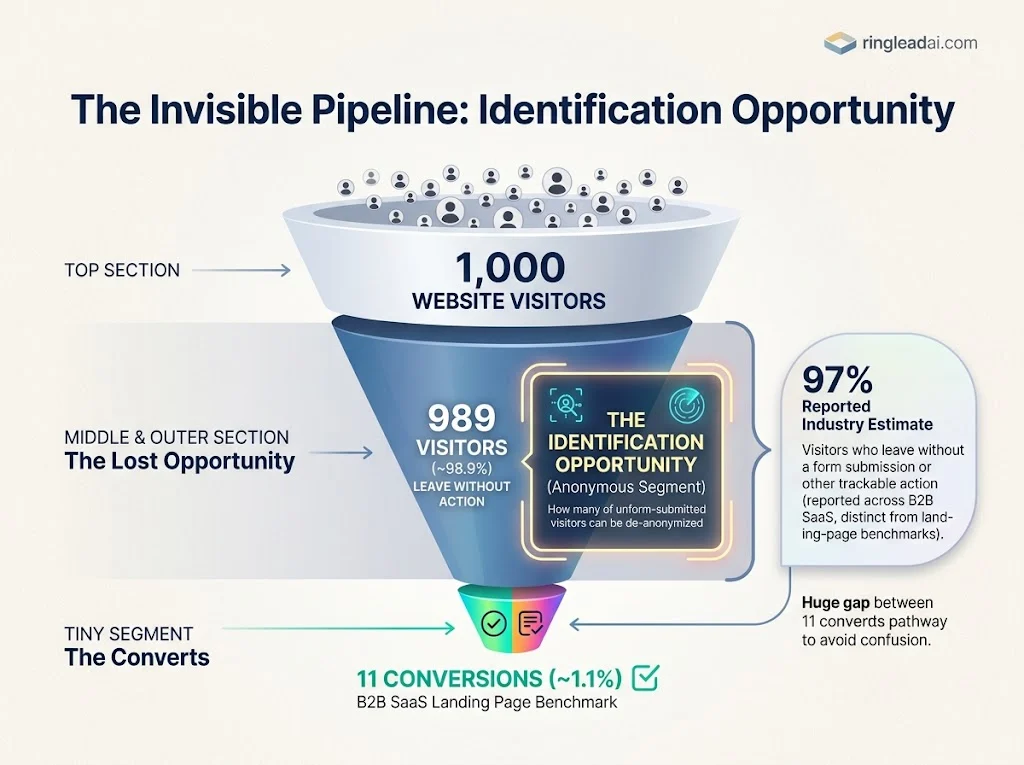
Your website may attract thousands of potential buyers, but most leave without filling out a form. Common Room reports that roughly 97% of B2B website visitors leave without submitting a form or taking another trackable action. First Page Sage's 2026 benchmark puts the B2B SaaS landing-page conversion rate at 1.1%. Applied to 1,000 landing-page visitors, that is approximately 11 conversions—not hundreds of new leads.
The gap is where demand generation teams lose visibility. Buyers visit pricing pages, compare solutions, read case studies, and leave without identifying themselves. Your analytics records the activity, but your sales team may never know which accounts showed interest.
The usual response is to collect more data manually. Someone researches company domains, enriches contact records, checks LinkedIn, and updates the CRM. If your team is spending 8–12 hours a week on this work, that time comes directly out of campaign execution and sales follow-up.
Visitor identification tools promise to close this gap. Some advertise match rates of 60–80% or higher, but a headline number does not tell you how many matches are accurate, how many identify a useful target account, or how many turn into meetings. Vendors also define match rate differently. Company-level identification and person-level identification are not interchangeable, and neither guarantees buying intent.
That skepticism is justified. You do not need another dashboard full of visitor records that sales ignores. You need a process that produces reliable account signals, respects privacy requirements, and gives the right records to the right people at the right time.
This guide takes a practical, compliance-first approach. You will learn how website visitor identification works, why company-level identification is often the sensible starting point, when person-level identification is worth the additional cost, and how to assess realistic match rates. We will also cover tracking setup, suppression lists, lawful basis, CRM routing rules, and the metrics that connect identification to pipeline.
The goal is not to identify everyone. It is to identify enough of the right accounts to make your investment worthwhile.
By the end, you will have a framework for choosing a starting method, evaluating vendor claims against your own traffic, and building a workflow from an anonymous visit to a qualified sales action. Use the match-rate estimator and ROI worksheet in this guide to test the business case before committing to a tool budget.
Start with the numbers, check the privacy implications, and then build a process your sales team will actually use.
#How Website Visitor Identification Works
Website visitor identification turns website activity into information your marketing and sales teams can act on. The process typically has four stages: tracking, signal collection, database matching, and identity resolution.
The important distinction is what the system can actually identify. Company-level identification may reveal that someone from a target account visited your pricing page. Person-level identification attempts to associate activity with a specific individual, but that result depends on the available signals, the vendor's data, and the identification method. A visit alone does not prove buying intent.
#The Four-Stage Pipeline: Script, Signals, Matching, Resolution
Stage 1: Tracking script. A JavaScript snippet or tag runs on your website and records permitted visitor activity. Depending on the implementation, this can include page views, timestamps, and referral information.
Stage 2: Signal collection. The system gathers available signals, potentially including IP addresses, cookie identifiers, device and browser information, and browsing behavior. The precise data collected depends on the script, configuration, and applicable consent requirements.
Stage 3: Database matching. The vendor compares available signals against its company databases, contact records, or identity graph. A match is not guaranteed, and different vendors may use different matching methods.
Stage 4: Identity resolution. The system returns a result at the level supported by the evidence. That might be a company name, an account profile, or a possible individual identity. The output should distinguish a confirmed match from an inference or probabilistic association.
For demand generation, the useful output is not simply a visitor record. It is a sufficiently reliable match that can support an appropriate next action, such as researching an account, tailoring an advertising audience, or triggering a sales review.
#First-Party Tracking Scripts and What They Capture
A first-party tracking script is deployed through your own website or domain. It can collect activity such as page URLs, visit times, referral sources, and certain device or browser signals. When configured to do so, it may also transmit an IP address or cookie identifier to the identification provider.
First-party deployment can give you more control over implementation and data flows. However, first-party tracking is not automatically more compliant or more reliable. The result depends on how the script operates, which parties receive the data, the applicable privacy rules, and whether the required consent or other lawful basis is in place.
Before installing a vendor's script, check what it collects, where the data goes, how long it is retained, and whether it sets or reads cookies or other identifiers. Document the relevant processing purposes and confirm whether a data processing agreement (DPA) is required. A DPA helps define responsibilities between the parties; it does not, by itself, make the tracking lawful.
Expert tip: Choose a vendor that clearly documents its data collection, subprocessors, retention periods, and deletion process. Sign the appropriate DPA where required, and configure the script to respect your consent-management system and privacy choices.
#IP, Cookies, and Identity Signals
Visitor identification relies on signals, not a universal identifier that works for every visitor. Each signal has limitations.
- IP address: Often used for company-level reverse-IP lookup. The vendor compares an address with known business network information to estimate which organization may be associated with a visit. Shared offices, VPNs, mobile networks, remote workers, and internet service providers can reduce accuracy. An IP address can also constitute personal data under the GDPR when it relates to an identifiable person.
- Cookies and browser identifiers: These can help maintain session continuity or recognize a returning browser. Their use may be subject to consent requirements, depending on the technology and jurisdiction. Clearing cookies, changing browsers, or using privacy protections can break continuity.
- Firmographic information: Company domain, industry, size, and other business attributes can enrich an identified account. These details help sales teams assess whether the account fits their ideal customer profile, but they do not independently prove which employee visited.
- Email and contact signals: Some systems can associate activity with a known contact when a reliable identifier is available, such as a previously identified user or an appropriate first-party interaction. Access to contact databases does not mean a vendor can reliably discover the identity of every anonymous visitor.
- Behavioral signals: Pages viewed, repeat visits, and engagement with high-intent content can help prioritize follow-up. Behavior is a signal of possible interest, not proof that a person is ready to buy.
The practical lesson is to assess the signals your chosen method actually uses. Do not assume that every visitor generates every signal, or that combining more signals automatically produces a correct identity.
#Database Matching and Identity Resolution
After collecting the permitted signals, the vendor compares them with available data sources. For company identification, this may involve IP-to-company mappings, business network information, and firmographic databases. For person-level identification, methods may include matching known identifiers against contact records or using an identity graph that links records from multiple sources.
The resulting profile may include a company name, company domain, industry, estimated company size, relevant pages visited, and—in some cases—a possible contact identity. The fields available depend on the vendor and the strength of the match.
Match quality depends on database freshness, traffic composition, network conditions, signal availability, and the vendor's matching methodology. A match rate measured against all website sessions is not directly comparable with one measured against eligible business traffic or a vendor's own narrower sample.
Ask vendors to define their denominator, explain what counts as a match, and separate company-level matches from person-level matches. Then test performance on your own traffic before using the results to trigger sales outreach. The objective is a reliable, useful account signal—not the largest possible number of identified visitors.
#Company-Level vs Person-Level Identification
The first decision is whether you need to know which company visited your website or which individual may have visited. These are different identification methods, with different costs, data requirements, and privacy implications.
For most B2B demand generation teams, company-level identification is the sensible starting point. It can reveal target accounts researching your product without requiring every visit to be associated with a named contact. Person-level identification can provide more actionable contact details, but the additional detail does not automatically translate into better leads or more meetings.
#What Company-Level Reveals
Company-level identification uses signals such as IP addresses and company databases to associate website activity with an organization. Depending on the provider and available signals, the resulting account profile may include:
- Company information: Organization name, domain, industry, and estimated company size.
- Visit activity: Pages viewed, visit timing, referral source, and repeat visits where the system can recognize them.
- Account intent signals: Visits to pricing, product, integration, or case-study pages that may warrant further investigation.
- Sales opportunities: Accounts that match your ideal customer profile (ICP) and can be routed to the appropriate account owner.
This method works well for account-based marketing, sales alerts, and mid-market pipeline development. For example, if a company that fits your ICP visits your pricing page twice in three days, your sales team can investigate the account and decide whether a relevant follow-up is justified.
Company-level identification is often less expensive and less intrusive than person-level tracking, but neither advantage is guaranteed across all vendors. IP addresses can constitute personal data under GDPR, and the processing still requires an appropriate legal basis and safeguards. Cookie and device-access requirements must also be assessed separately where applicable. <Cite refs={["turn508702search4","turn508702search6"]} />
#What Person-Level Reveals
Person-level identification attempts to associate website activity with a specific individual. Depending on the provider, method, and available data, it may return a contact name, business email address, job title, social profile, or phone number.
There are important limitations. Some tools recognize previously known contacts, while others use third-party data to identify certain visitors. Coverage may vary by geography, and a contact record associated with a visit does not necessarily prove that the named person was the person browsing at that moment. For example, a shared device or an unreliable identity association can produce a misleading result.
Person-level identification is most useful when the potential account value justifies the additional cost and scrutiny. A team selling a high-value enterprise solution may use it to research decision-makers at a small number of high-intent accounts. A business selling to a broad audience may find that company-level identification and form-based lead capture provide better value.
Apply person-level identification selectively. Prioritize high-intent accounts, verify contact data before outreach, and check the lawful basis, transparency, objection rights, and applicable electronic-marketing rules before using personal information. A vendor's ability to return an email address does not, by itself, establish permission to send marketing emails.
Visitor Identification Tech
#Side-by-Side Comparison
Compare company-level reverse IP lookup against person-level identification to determine the right data enrichment strategy for your team.
| Factor | Company-Level Reverse IP Lookup | Person-Level Identification |
|---|---|---|
| What it reveals | Company name, firmographics, and associated visit activity. | Potential individual name, business email, title, and sometimes social profile or phone. |
| Typical match rate | Not confirmed — verify Results depend on traffic quality, geography, and the definition of a match. | Not confirmed — verify Coverage varies by provider, identification method, and visitor location. |
| Privacy risk | Often lower than person-level identification, but IP and behavioral data may still be personal data. | Generally higher because identifiable contact details and individual-level activity may be processed. |
| Relative cost | Often lower, depending on provider and usage limits. | May cost more, particularly where contact identification or enrichment is an additional feature. |
| Best for | Account-based routing, account research, sales alerts, and mid-market pipeline | High-value accounts, targeted contact research, and carefully governed direct outreach |
| Main limitation | May identify the organization without identifying the actual visitor. | May return no contact, incomplete details, or an incorrect association. |
Compliance caution: Person-level data processing requires stringent compliance governance (GDPR/CCPA/privacy policies) prior to launching automated sales workflows.
How to interpret match rates: Do not compare percentages until vendors define the denominator and the outcome being counted. One provider may measure identified companies against all sessions; another may exclude bots, consumer traffic, or sessions it considers ineligible. A person-level match rate measures a different outcome from a company-level match rate.
I could not confirm the proposed 30–60% of US B2B traffic, 85–95% of filtered corporate sessions, or 5–20% person-level match rates as consistent, independently verified benchmarks across providers. Treat these figures as unverified until the underlying methodology and current source data are checked. Vendor documentation describes different capabilities, but feature descriptions alone do not establish a comparable match-rate benchmark. <Cite refs={["turn508702search2","turn508702search5","turn508702search11"]} />
#What Match Rate Should You Plan For?
For budgeting, use a conservative internal assumption rather than treating a vendor's headline figure as a forecast. The suggested 20–50% identification range for filtered, ICP-fit traffic is a planning hypothesis, not a confirmed industry benchmark. Validate it with a pilot using your own eligible traffic.
Measure at least three separate outcomes:
- Company identification rate: The percentage of eligible sessions associated with a company.
- ICP-fit identification rate: The percentage of eligible sessions that resolve to companies matching your target-account criteria.
- Actionable account rate: The percentage of identified accounts that meet your quality threshold and justify a sales or marketing action.
These measures answer different questions. A tool might identify many companies but produce few accounts that fit your ICP. Another might return fewer matches but identify more useful prospects. For pipeline, the second outcome can be more valuable.
Expert tip: Start with company-level identification if your goal is account-based routing and sales alerts. Run a controlled pilot, measure the rate of usable ICP-fit accounts, and compare the results with the vendor's quoted match rate. Add person-level identification only when the extra contact data creates enough incremental value to justify its cost and compliance requirements.
The best method is not the one that identifies the largest number of visitors. It is the one that gives your team reliable information it can use to create qualified opportunities.
#Realistic Match Rate Expectations
A visitor identification tool can report a strong match rate in a demo and deliver a very different result on your website. The reason is straightforward: the traffic used to demonstrate a product may not resemble the traffic you actually receive.
Some vendors advertise company-level identification rates of 60–80% or higher. These claims need context. Ask whether the percentage covers all sessions, eligible B2B traffic, US visitors only, or a filtered set of corporate networks. Also ask whether the vendor measures identification coverage or the accuracy of the identities it returns.
Warmly's March 2026 analysis reports company-level identification rates of approximately 30–65% and person-level rates of 5–20%. These are useful planning references, not guarantees for every website. Factors.ai also reports that its own company-identification coverage can reach 75% using multiple data sources, illustrating why vendor-specific results should not automatically be treated as universal benchmarks. <Cite refs={["turn119975search10","turn119975search1"]} />
The practical approach is to adjust expectations for your traffic mix, validate the results with a pilot, and measure how many identified accounts are actually useful to sales.
#Why Vendor Claims Don't Hold Up on Real Traffic
Real B2B traffic is not limited to employees browsing from identifiable corporate office networks. Your visitors may be using mobile devices, home broadband, personal VPNs, shared networks, or company-managed remote-access systems.
Each situation can affect identification differently. A corporate VPN may preserve a recognizable company network signal, while a personal VPN may obscure the visitor's original network. Mobile and residential connections can make IP-to-company matching more difficult, particularly when an address is shared or changes frequently.
Geography matters, too. Vendors maintain different data sources and have different coverage across markets. A result achieved on a US-heavy audience may not transfer directly to a website receiving substantial traffic from Europe, Asia-Pacific, or other regions.
That is why a headline percentage is not enough to justify a purchase. Request results broken down by geography, traffic type, and identification method. If a vendor cannot explain its denominator or provide a credible way to test the result on your own traffic, treat the headline figure as a sales claim rather than a forecast.
#Traffic Mix Variables: Corporate Desktop, Mobile, VPN, and Remote Work
Your traffic composition influences the number of visitors a tool can identify. These categories can overlap—a remote employee might use a desktop computer through a corporate VPN—so classify sessions consistently before estimating results.
- Corporate desktop: Sessions from known business networks can be easier to associate with an organization, especially when the IP address maps reliably to a company's network.
- Mobile traffic: Identification can be less consistent when visitors use cellular networks, shared addresses, or personal devices. Mobile traffic is not automatically unidentifiable; the result depends on the available signals.
- VPN traffic: Corporate VPNs can still provide useful company signals. Personal VPNs and privacy services may make the original organization harder to resolve.
- Remote workers: Home broadband and personal devices can weaken the relationship between an IP address and an employer. Some providers use additional data sources to improve coverage, but performance varies.
Do not assign a fixed match rate to each category unless the vendor provides supporting data. The available published ranges do not establish a universal, independently verified rate for every combination of device, network, and region.
#A Realistic Range to Plan Around
Use the following figures as starting points for a vendor evaluation—not as promises of what your website will achieve.
| Identification Measure | Planning Reference | How to Use It |
|---|---|---|
| Company-level identification | ~30–65% In Warmly's published analysis | A broad reference for evaluating company-level coverage; validate it against your actual traffic. |
| Person-level identification | ~5–20% In Warmly's published analysis | A reference for potential individual matches, not a guarantee of verified contact details or outreach permission. |
| Filtered corporate sessions | 85–95% Not confirmed — verify | Do not use this as a benchmark until the original source defines the traffic filter, denominator, and measurement method. |
| Filtered, ICP-fit traffic | 20–50% Not confirmed — verify | Treat this as a proposed planning hypothesis, not an established benchmark. Filtering changes the denominator and does not guarantee a higher useful-match rate. |
Methodology Note: Match rates vary heavily based on geographic distribution, B2B vs B2C traffic mix, mobile share, and ISP filtering rules.
Keep three measurements separate:
- Identification coverage: The share of eligible sessions or visitors for which the tool returns a company or person match.
- Match accuracy: The share of returned matches that correctly identify the organization or individual.
- Actionable account rate: The share of identified accounts that fit your ICP and justify a sales or marketing action.
These are different outcomes. A tool may return a large number of company matches but identify relatively few target accounts. Another may return fewer matches but provide a more useful set of accounts for sales.
#Interactive Match-Rate Estimator
Use this estimator to see how your traffic mix affects the assumptions you should test. It deliberately does not invent separate match-rate percentages for mobile, VPN, or remote traffic. Those rates must come from vendor evidence or your own pilot.
{@body const [sessions,setSessions] = DIL.useState(10000)}
{@body const [desktop,setDesktop] = DIL.useState(40)}
{@body const [mobile,setMobile] = DIL.useState(30)}
{@body const [vpn,setVpn] = DIL.useState(10)}
{@body const [remote,setRemote] = DIL.useState(20)}
{@body const [low,setLow] = DIL.useState(30)}
{@body const [high,setHigh] = DIL.useState(65)}
{@body const [desktopLow,setDesktopLow] = DIL.useState(85)}
{@body const [desktopHigh,setDesktopHigh] = DIL.useState(95)}
{@body const [pilot,setPilot] = DIL.useState(false)}
{@body const totalMix = desktop+mobile+vpn+remote}
{@body const mixValid = totalMix===100}
{@body const lowEstimate = sessionslow/100}
{@body const highEstimate = sessionshigh/100}
{@body const corpLow = sessionsdesktop/100desktopLow/100}
{@body const corpHigh = sessionsdesktop/100desktopHigh/100}
<box border radius="xl" padding={4} gap={4}>
<title size="lg">Traffic mix and identification estimate</title>
<text color="secondary" size="sm">Enter your monthly sessions and estimated traffic mix. The broad estimate uses the published 30–65% company-level range. The corporate-session calculation is shown separately and uses the 85–95% assumption, which is unverified and should not be treated as a confirmed benchmark.</text>
<box gap={1}>
<label>Monthly website sessions</label>
<input inputType="number" value={String(sessions)} onChange={v=>setSessions(Math.max(0,Math.min(100000000,Number(v)||0)))}/>
</box>
<title size="md">Traffic mix (%)</title>
<box gap={1}>
<row align="center" justify="between">
<label>Corporate desktop</label>
<title size="sm" tabularNums>{desktop}%</title>
</row>
<slider min={0} max={100} step={5} value={desktop} onChange={v=>setDesktop(v)}/>
</box>
<box gap={1}>
<row align="center" justify="between">
<label>Mobile</label>
<title size="sm" tabularNums>{mobile}%</title>
</row>
<slider min={0} max={100} step={5} value={mobile} onChange={v=>setMobile(v)}/>
</box>
<box gap={1}>
<row align="center" justify="between">
<label>VPN</label>
<title size="sm" tabularNums>{vpn}%</title>
</row>
<slider min={0} max={100} step={5} value={vpn} onChange={v=>setVpn(v)}/>
</box>
<box gap={1}>
<row align="center" justify="between">
<label>Remote / residential</label>
<title size="sm" tabularNums>{remote}%</title>
</row>
<slider min={0} max={100} step={5} value={remote} onChange={v=>setRemote(v)}/>
</box>
<row align="center" justify="between">
<text color="secondary" size="sm">Total traffic mix</text>
<title size="md" color={mixValid?"success":"danger"}>{totalMix}%</title>
</row>
{#if !mixValid}
<text color="danger" size="sm">Adjust the sliders until the traffic mix totals 100%. The broad estimate below remains a general reference, not a mix-adjusted prediction.</text>
{/if}
<divider />
<title size="md">Broad company-level reference range</title>
<row align="end" gap={2}>
<box flex="1" background="surface-secondary" radius="lg" padding={3} gap={1}>
<text color="secondary" size="sm">Lower reference (30%)</text>
<title size="xl" tabularNums>{Math.round(lowEstimate).toLocaleString()}</title>
<text color="secondary" size="xs">Potentially identified sessions</text>
</box>
<box flex="1" background="surface-secondary" radius="lg" padding={3} gap={1}>
<text color="secondary" size="sm">Upper reference (65%)</text>
<title size="xl" tabularNums>{Math.round(highEstimate).toLocaleString()}</title>
<text color="secondary" size="xs">Potentially identified sessions</text>
</box>
</row>
<text color="secondary" size="sm">This applies the published broad range to your session total. It does not adjust for the traffic mix because comparable, verified identification rates for each segment are not available here.</text>
<divider />
<title size="md">Optional corporate desktop scenario</title>
<text color="secondary" size="sm">Uses the proposed 85–95% rate for the corporate desktop share only. This is an unverified scenario for comparison, not a validated forecast.</text>
<row gap={2}>
<box flex="1" background="surface" border radius="lg" padding={3} gap={1}>
<text color="secondary" size="sm">Lower scenario</text>
<title size="lg" tabularNums>{Math.round(corpLow).toLocaleString()}</title>
<text size="xs" color="secondary">{Math.round(desktop*desktopLow/100)}% of all sessions</text>
</box>
<box flex="1" background="surface" border radius="lg" padding={3} gap={1}>
<text color="secondary" size="sm">Upper scenario</text>
<title size="lg" tabularNums>{Math.round(corpHigh).toLocaleString()}</title>
<text size="xs" color="secondary">{Math.round(desktop*desktopHigh/100)}% of all sessions</text>
</box>
</row>
<text color="secondary" size="xs">The two ranges must not be added together: the broad estimate already includes mixed traffic. Counts are sessions, not necessarily unique visitors or verified companies.</text>
<button block onClick={()=>GenUI.copy("Website Visitor Identification Estimator\nMonthly sessions: "+sessions+"\nTraffic mix: corporate desktop "+desktop+"%, mobile "+mobile+"%, VPN "+vpn+"%, remote/residential "+remote+"% (total "+totalMix+"%)\nBroad company-level reference: "+Math.round(lowEstimate)+"–"+Math.round(highEstimate)+" sessions (30–65%; published benchmark range, not a prediction)\nCorporate desktop scenario: "+Math.round(corpLow)+"–"+Math.round(corpHigh)+" sessions (85–95%; unverified assumption)\nSegment-specific rates: require vendor evidence or pilot data.")}>Copy estimate</button>
</box>
How to use the estimator: First, check whether your traffic categories total 100%. Then use the broad range as a starting reference, not a promise. To make the result genuinely traffic-mix-adjusted, ask vendors to provide identification coverage by segment—or run a pilot and measure it yourself.
For a useful pilot, record total eligible sessions, identified companies, verified matches, ICP-fit accounts, and actionable accounts. Keep the same measurement window and denominator when comparing vendors. That gives you evidence you can use to justify the budget, rather than a headline match rate that may not translate into pipeline.
#Step-by-Step Implementation Guide
A visitor identification tool only creates value when it connects website activity to a useful sales or marketing action. The implementation process should therefore cover tracking, identification, data quality, suppression, routing, and measurement—not just installing a script.
Start with company-level identification, validate the results, and add person-level enrichment only when it improves the quality of your opportunities.
#Step 1: Install a First-Party Tracking Script
Install the identification provider's tracking script using your website's tag manager or the deployment method recommended by the vendor. Google Tag Manager can simplify deployment and updates, but it does not automatically make tracking compliant.
Check the script on the pages that matter to your buying journey:
- Pricing and product pages
- Demo and contact pages
- Competitor comparison pages
- Case studies and integration pages
- Relevant blog articles and landing pages
Verify that the script loads correctly, records the expected events, and sends data only as documented. Test consent behavior, including what happens when a visitor rejects or withdraws consent where required.
Document the script's purpose, the data it collects, the vendors receiving that data, and the applicable consent or lawful-basis requirements. This documentation will support your later privacy review.
Recommended baseline: Google Analytics 4 (GA4) provides traffic and engagement analytics that complement visitor identification. It is not a substitute for company identification, and its reports should not be treated as proof of a visitor's identity.
#Step 2: Configure Company-Level Reverse IP Lookup
Begin with company-level identification before introducing person-level enrichment. It gives you a way to assess account coverage and sales usefulness without immediately adding individual contact records to the workflow.
Configure the vendor to return the company information you need, such as organization name, domain, industry, estimated size, and associated page activity. Check whether its database covers your target markets. A provider with strong US coverage may perform differently on traffic from the UK, Europe, or other regions.
Next, validate the results. Use known business-network visits where practical, but do not assume that a visit from an employee's home connection will resolve to the correct employer. Record incorrect matches and sessions where no company is identified.
Example to evaluate: Leadfeeder is a commonly used example of a company-level visitor identification platform. Assess its current capabilities, coverage, pricing, and data methodology against your own requirements rather than selecting it on brand recognition alone.
#Step 3: Add Person-Level Enrichment Only Where It Pays
Do not automatically attach individual contact records to every identified company. First establish whether the account is relevant and whether its activity justifies further investigation.
Use person-level enrichment selectively for accounts showing meaningful buying signals, such as repeated pricing-page visits, demo-page engagement, or activity across several high-intent pages. Where available, enrich the account with relevant firmographic information and a clearly defined intent signal.
Keep the distinction between a company match and a person match visible in your systems. A company-level match should not be displayed as though a specific employee has been identified. Likewise, a possible person-level association should not be treated as verified without adequate evidence.
Platforms to evaluate: Clearbit, now part of HubSpot's data platform, and RB2B are examples worth researching for relevant identification or enrichment capabilities. Features, eligibility, regional coverage, and data availability can change, so confirm current product documentation before implementation.
Before using enriched contact details for outreach, check the applicable privacy and electronic-marketing rules. Identification capability is not the same as permission to contact someone.
#Step 4: Build Suppression Lists and Routing Rules
Create suppression lists before activating automated alerts. Otherwise, your team may receive notifications about accounts that should not enter the standard prospecting workflow.
Start with four lists:
- Existing customers: Route relevant activity to the customer success or account management team rather than treating the account as a new prospect.
- Churned accounts: Route visits to the appropriate reactivation or customer marketing workflow, where justified.
- Competitors: Exclude competitor activity from ordinary prospecting alerts and send appropriate signals to a restricted competitive-intelligence channel.
- Partners and non-prospect traffic: Filter known partners, recruitment-related traffic, and other categories that do not fit the sales workflow.
Use domain and account records to maintain these lists, and refresh them weekly or whenever important account changes occur. Apply role-based access to sensitive competitive or customer information.
Suppression should not mean ignoring every visit. It means directing activity to the right workflow. An existing customer repeatedly viewing an integration page, for example, may need support rather than a sales pitch.
Expert tip: Define a routing rule for every major account category before enabling alerts. Specify who receives the signal, what action is expected, and when the signal should expire.
#Step 5: Set Up High-Intent Alerts
Not every page view deserves a sales notification. Start with pages that are closely related to evaluation or purchase decisions:
- Pricing and plans
- Demo and contact pages
- Product and integration comparisons
- Relevant case studies
- Product-specific solution pages
Then add thresholds to reduce noise. For example, you could test an alert when an ICP-fit account visits a pricing page and returns within a defined period. Another rule might require activity across multiple high-intent pages before notifying sales.
Treat these thresholds as starting hypotheses. The right settings depend on your sales cycle, average deal value, traffic volume, and the quality of your identification data.
Route alerts using account ownership, territory, customer status, and segment. Include the company match, pages viewed, timestamps, match confidence where available, and the reason the alert fired. Avoid presenting inferred individual identity as confirmed fact.
Expert tip: Enrich and qualify an account before sending an alert. A smaller number of relevant notifications is generally more useful than a high-volume stream that sales eventually ignores.
#Step 6: Sync to CRM and Score Accounts
Connect the identification platform to your CRM so that useful account signals are available where sales and customer success teams already work. HubSpot and Salesforce are common options for account records, workflows, ownership, and routing, depending on your existing setup.
Map fields carefully. A practical starting set includes:
- Company name and domain
- Identification method and match status
- Pages viewed and visit timestamps
- Relevant firmographic attributes
- ICP-fit score and intent indicators
- Assigned account owner
- Suppression status and next action
Avoid creating a new lead for every identified company visit. A company-level match does not necessarily provide a qualified contact, and duplicate records can quickly reduce CRM quality. Where possible, associate the activity with an existing account or create a new account only when it meets your data-quality rules.
Score accounts using three dimensions:
Fit: Does the company match your target industry, size, geography, and other ICP criteria?
Intent: Has the account visited pricing, demo, comparison, or other commercially relevant pages?
Engagement: Is there repeated or meaningful activity over a defined period?
Use these scores to prioritize account review, not as proof that a buyer is ready to purchase. Set a minimum threshold before routing an account to sales, and keep customer-success activity separate from new-business prospecting.
Automation can reduce manual enrichment and data entry, but do not promise a fixed saving of 8–12 hours per week without measuring your team's existing workload. Track the time spent before and after implementation to calculate the actual operational benefit.
#Step 7: Test, Measure, and Adjust Match Rates
Run a controlled pilot before rolling out identification across every workflow. Establish a baseline and record the total eligible sessions, identified companies, verified matches, ICP-fit accounts, and sales actions generated.
Review the results by traffic source, geography, device or network segment where reliable data is available, and identification method. This helps reveal whether a low match rate reflects weak coverage, a traffic mix that is difficult to identify, or an implementation problem.
Then connect identification activity to CRM outcomes. Measure:
- Identification coverage: How much eligible traffic produces a match?
- Match accuracy: How often are returned company or person identities correct?
- ICP-fit account rate: What proportion of identified accounts meet your targeting criteria?
- Sales acceptance: How many routed accounts are accepted for follow-up?
- Meetings and opportunities: How many identified accounts progress to meaningful pipeline activity?
- Operational savings: How much manual research and data entry time has actually been reduced?
Where practical, compare outcomes with a similar group of accounts that did not receive the same identification-driven intervention. This helps distinguish correlation from incremental impact.
Finally, adjust suppression lists, routing thresholds, scoring, and person-level enrichment based on the results. If a rule generates many alerts but few accepted accounts or meetings, revise it. If a particular segment consistently produces qualified opportunities, investigate whether expanding that workflow is justified.
The implementation goal is simple: identify accounts reliably, route the right signals to the right team, and prove that the process improves sales efficiency or pipeline quality. More identified visitors is not enough.
#Compliance and Privacy: GDPR, CCPA, and ePrivacy
Website visitor identification creates a data protection responsibility that does not disappear because the visitor never filled out a form. IP addresses, cookie identifiers, browsing activity, and enriched contact details may fall within privacy laws, depending on the data and circumstances.
Before launching a visitor identification tool, establish what information it collects, why it collects it, where that information goes, and which rules apply to your visitors. The requirements vary by jurisdiction, tracking technology, and intended use. A B2B audience does not automatically exempt your organization from privacy obligations.
#Lawful Basis: Legitimate Interest vs. Consent
Under the GDPR, legitimate interest can be a lawful basis for certain personal-data processing activities, including some business-related processing. It is not an automatic permission to identify website visitors. You must assess whether the interest is legitimate, whether the processing is necessary, and whether the individual's interests, rights, and freedoms override that interest. Document this assessment in a legitimate interests assessment (LIA) where appropriate. The European Data Protection Board's guidance on legitimate interests provides further context.
Company-level identification may be supportable under legitimate interest in some circumstances, but the answer depends on the signals collected, how they are matched, what the organization does with the results, and the reasonable expectations of the people concerned. An IP address can still constitute personal data even when the final report displays a company name.
Person-level identification generally requires closer scrutiny because it may involve names, business email addresses, job titles, and individual browsing activity. However, it is not accurate to say that person-level identification always requires consent under GDPR. The appropriate lawful basis depends on the processing, while other legal requirements may independently require consent.
Expert tip: Document the lawful basis for each processing purpose before activating identification. Keep the assessment specific to the actual data flows, and revisit it when you introduce new tracking methods, additional enrichment, or a new use for the data.
#Cookies and ePrivacy: What Needs Consent?
GDPR and ePrivacy-related rules address different questions. GDPR governs the processing of personal data. In the UK, the Privacy and Electronic Communications Regulations (PECR) regulate the storage of information on, or access to information stored on, a user's device. EU member states implement the ePrivacy Directive through their national laws.
Under UK PECR, non-essential cookies and similar technologies generally require informed consent before they are used. The rules can also apply to technologies beyond conventional cookies, including tracking pixels, scripts, and certain fingerprinting techniques. There are limited exceptions, such as technologies that are strictly necessary for a service requested by the user. Business development value alone does not make a tracking technology strictly necessary.
For implementation:
- Audit every script: Identify the cookies, device identifiers, pixels, and other storage or access technologies used by your identification provider.
- Configure consent controls: Where consent is required, prevent the relevant technologies from running until valid consent is obtained.
- Respect withdrawal: Make it possible for visitors to change their preferences and ensure the tracking system responds accordingly.
- Document cookie purposes: Explain what the technologies do, which providers receive data, and how the information is used.
A company-level IP lookup that does not store information on or access information from a visitor's device may avoid certain cookie-consent requirements. That does not automatically remove GDPR obligations, nor does it establish that every script-based implementation is exempt. Assess the actual technical behavior rather than relying on a vendor's description of its product.
The UK Information Commissioner's Office provides detailed guidance on cookies and similar technologies.
Tools to evaluate: CookieYes and OneTrust offer consent-management capabilities worth assessing. Compare their current features, supported jurisdictions, integration options, and ability to block relevant scripts before consent. Installing a consent-management platform does not guarantee compliance; the configuration must match your actual tracking setup.
#Data Processing Agreements and Vendor Due Diligence
Your identification vendor may receive website activity, IP addresses, identifiers, and other data on your behalf. Before enabling the service, establish the parties' roles and responsibilities and determine whether a data processing agreement (DPA) is required.
Under GDPR, a controller using a processor must have the appropriate contractual arrangements under Article 28. A DPA does not replace your responsibility to establish a lawful basis, provide required privacy information, and meet any applicable consent obligations.
Review these points before signing:
- Data collection: What signals does the vendor collect, and which are necessary for the service?
- Retention: How long are raw events, identifiers, and enriched profiles stored?
- Subprocessors: Which additional providers receive or process the data?
- International transfers: If data leaves the relevant jurisdiction, what transfer mechanism and safeguards apply?
- Individual rights: Can the vendor support applicable access, correction, deletion, objection, and restriction requests?
- Security: What access controls, incident procedures, and safeguards protect the data?
- Data use: Does the vendor use your visitor data for its own purposes, combine it with other datasets, or share it beyond providing the service?
Pay particular attention to the last point. A vendor may act as a processor for some activities and as an independent controller for others. Contract terms and actual data practices should establish which arrangement applies.
#CCPA: The B2B Exemption Has Expired
The California Consumer Privacy Act (CCPA), as amended by the California Privacy Rights Act (CPRA), no longer provides the former broad exemptions for employee information and personal information involved in business-to-business transactions. Those exemptions expired on December 31, 2022. The California Attorney General confirms this in its CCPA guidance.
That matters for B2B visitor identification. Business contact information and website activity can fall within California privacy requirements when the law applies. A company's B2B focus does not automatically exempt its collection or use of personal information.
Review whether your organization meets the law's applicability criteria and determine which obligations apply to your activities. Depending on the circumstances, these may include:
- Providing a compliant notice at collection.
- Explaining relevant collection and use practices in the privacy policy.
- Handling applicable requests to know, delete, or correct personal information.
- Honoring valid opt-out requests relating to the sale or sharing of personal information.
- Applying required controls to relevant third-party disclosures and targeted advertising practices.
Do not assume that every disclosure to a visitor identification vendor constitutes a sale or sharing under California law. The answer depends on the relationship, contractual terms, data flows, and statutory definitions. Equally, do not assume that a vendor contract alone removes the need to assess those obligations.
CCPA compliance is an ongoing operational responsibility. Keep notices, request-handling procedures, vendor assessments, and opt-out mechanisms aligned with your current implementation. Review the California Privacy Protection Agency's official resources for current requirements and regulations.
#Compliance Review: Keep It Current
Last updated: October 12, 2026
This section provides general information for B2B demand generation teams. It is not legal advice. GDPR, ePrivacy-related national laws, UK PECR, and California privacy requirements differ and may change. Confirm your specific tracking setup and intended uses with qualified privacy counsel before deployment.
For a practical compliance review, maintain a record of:
- The identification scripts and data fields in use.
- The purposes and lawful bases for processing.
- The legitimate interests assessment, where applicable.
- Cookie and similar-technology consent requirements.
- Privacy notices and consent-management settings.
- Vendor agreements, subprocessors, retention, and transfer safeguards.
- Processes for handling applicable privacy requests and objections.
Author and experience note: Add a verified author biography identifying the writer's actual B2B demand generation, RevOps, or privacy-related experience. If the author has tested visitor identification tools, state which tools were tested, the traffic types and regions covered, and the limits of the test. Do not claim hands-on testing or legal expertise unless it can be substantiated.
#Tool Selection Criteria and Comparison
Choosing a website visitor identification tool requires more than comparing advertised match rates or monthly prices. The right choice depends on your traffic mix, privacy requirements, CRM setup, and ability to turn identified accounts into qualified opportunities.
#Evaluation Criteria: Match Rate, Compliance, CRM Integration, and Price
- Match rate: Ask vendors for benchmarks based on your expected traffic mix, including mobile visits, remote workers, VPN usage, and international traffic. Request the methodology behind their figures rather than relying on ideal-case claims.
- Compliance: Confirm the availability of a Data Processing Agreement (DPA), documentation supporting your compliance assessment, data-retention controls, and compatibility with your cookie consent setup. A vendor's compliance features do not automatically make your implementation lawful.
- CRM integration: Verify whether the tool supports native HubSpot or Salesforce integration, which fields it can sync, how duplicate records are handled, and whether routing workflows require additional configuration or paid features.
- Price: Compare the full cost of implementation, subscriptions, contact enrichment, and ongoing maintenance against the pipeline the tool may generate. Cost per identified visitor alone does not show whether the investment is worthwhile.
The strongest comparison is vendor-neutral. Evaluate each platform against the same requirements, test it with your own traffic, and measure qualified meetings and opportunities rather than identification volume alone.
#Website Visitor Identification Tool Landscape
The following tools cover different stages of the identification pipeline. They are examples of relevant categories, not a universal ranking. Product capabilities, ownership, pricing, and integrations can change, so verify current details before publishing or purchasing.
| Tool | Pipeline Stage | What It Does | Best For |
|---|---|---|---|
| Google Analytics 4 | Baseline analytics | Measures traffic sources, page views, events, and user behavior within its reporting capabilities. It does not independently identify every anonymous business visitor. | Establishing a baseline and segmenting website traffic |
| Leadfeeder | Company-level identification | Helps identify companies visiting a website and provides account-level visit insights, subject to available data and configuration. | Account-based routing and sales alerts |
| Clearbit / RB2B | Enrichment & visitor identification | These are distinct offerings with different capabilities. Clearbit is associated with HubSpot's data platform; RB2B focuses on person-level visitor identification. Verify current product availability and features. | Enriching selected accounts or investigating person-level identification options |
| 6sense | Account intelligence and intent | Supports account-based marketing, buying-intent insights, and account prioritization. | Enterprise ABM programs |
| Factors.ai | Account intelligence and attribution | Supports account-level analytics, marketing attribution, and insights into account engagement. | Teams measuring account engagement across marketing channels |
| HubSpot / Salesforce | CRM, scoring, and workflow | Stores account and contact records and can support lead scoring, routing, task creation, and sales follow-up. Identification generally requires an appropriate data source or integration. | Centralizing lead management and sales workflows |
| CookieYes / OneTrust | Consent management | Provides consent-management capabilities to help organizations manage privacy preferences and cookie-related controls. Configuration and legal requirements vary. | Supporting consent and privacy workflows |
#How to Choose the Right Combination
You do not necessarily need all seven tools. Start with the capabilities your team lacks.
- For a small B2B team: Establish analytics, test company-level identification, and connect useful alerts to your existing CRM.
- For a growing sales team: Prioritize reliable account matching, enrichment, suppression rules, and automated routing.
- For an enterprise ABM program: Evaluate account-intent data, scoring, attribution, integration requirements, and governance across teams.
- For privacy-sensitive operations: Review the complete data flow, including tracking scripts, consent behavior, vendor processing, retention, and downstream outreach.
Before committing to a contract, run a pilot using representative traffic. Compare identified accounts with independently verified records, review false positives, and track how many accepted alerts become qualified meetings and opportunities.
#Common Mistakes and FAQ
#Mistakes to Avoid
Website visitor identification can generate useful sales signals, but poor implementation can create noise, waste sales time, and introduce privacy risks.
- Chasing person-level certainty: Start with company-level identification when account-level insights are sufficient. Person-level identification is a separate capability and will not resolve every visit.
- Ignoring compliance: Review tracking behavior, lawful basis, consent requirements, vendor contracts, and data-retention practices before deployment.
- Skipping suppression lists: Exclude or redirect existing customers, churned accounts, competitors, partners, and job seekers according to your routing rules.
- Trusting headline match rates: Ask how results change across mobile traffic, VPNs, remote workers, and international visitors. Test the tool against your own traffic.
- Ignoring CRM workflows: Identification has limited commercial value if sales teams receive no actionable alerts or if identified accounts never enter a measurable follow-up process.
- Measuring volume instead of outcomes: Track qualified meetings, opportunities, and revenue contribution—not just the number of identified visitors.
#Frequently Asked Questions
What match rate should I realistically expect?
Published vendor figures vary by methodology, geography, traffic mix, and identification method. Company-level identification may produce higher match rates than person-level identification, but neither method has a universal benchmark. Treat figures such as 30–60% for company-level identification and 5–20% for person-level identification as planning estimates, not guarantees. The proposed 20–50% range for filtered ICP-fit traffic is not sufficiently verified to present as an established benchmark.
Should I start with company-level or person-level identification?
For many B2B teams, company-level identification is a sensible starting point because it supports account-based routing without requiring a named individual for every visit. However, it is not automatically cheaper, more accurate, or lower-risk in every implementation. Compare the available data, costs, compliance requirements, and intended use before choosing.
Is website visitor identification GDPR compliant?
It can be implemented in a compliant way, depending on the processing involved. Document the applicable lawful basis, assess transparency and data-subject rights, review the vendor's Data Processing Agreement, and evaluate cookie and device-access requirements separately under applicable ePrivacy rules. A DPA alone does not establish compliance.
How do I filter out existing customers and competitors?
Create suppression and routing lists for existing customers, churned accounts, competitors, and partners or job seekers. Route customers to customer success, competitors to competitive intelligence, and low-priority visitors to the appropriate nurture or exclusion workflow. Review the lists regularly to keep account classifications accurate.
Will VPN and mobile traffic affect match rates?
Yes. VPNs, shared networks, mobile connections, and remote-working arrangements can make company matching less reliable. Their effect depends on the provider's data sources and matching methodology. Request traffic-mix-adjusted benchmarks and validate them against your own website sessions.
Which visitor identification tool should I choose?
Compare match quality, compliance support, CRM integration, data coverage, total cost, and reporting. Choose the tool that supports your sales process and demonstrates measurable value in a pilot—not simply the one advertising the highest match rate.