Best VoIP Phone Systems for Small Business : Pricing, Features, and Expert Comparison
Compare the best VoIP phone systems for small businesses in 2026. Explore pricing, essential features, AI capabilities, setup requirements, and total costs to find the right solution for your team.

On this page
- 1. The Landline Is Costing You More Than You Think
- The Hidden Costs of Staying Put
- What This Guide Delivers
- 2. How We Evaluated Providers: Our Testing Methodology
- Why Transparency Matters in VoIP Comparisons
- Evaluation Criteria: The Eight Factors We Scored
- What We Did Not Test
- 3. Side-by-Side Comparison: All Recommended Providers
- 4. How to Use This Comparison
- Before You Decide
- Overview
- Key Features
- Pricing Tiers
- Pros
- Cons
- Final Verdict
- 5. Key Features
- Overview
- Key Features
- Pricing Tiers
- Pros
- Cons
- Best For
- Expert Tip
- Overview
- Key Features
- Pricing Tiers
- Pros
- Cons
- Best For
- Expert Tip
- Overview
- Key Features
- Pricing Tiers
- Pros
- Cons
- Best For
- Final Verdict
- Overview
- Key Features
- Pricing Tiers
- Pros
- Cons
- Best For
- Final Verdict
- 6. Yealink Desk Phones: The Hardware Pick for Desk-Based Teams
- Overview
- Key Features
- Pricing
- Pros
- Cons
- Best For
- Expert Tip
- The Sticker Price Is Not the Real Price
- Hidden Cost #1: Hardware
- Hidden Cost #2: Number Porting
- Hidden Cost #3: International Calling
- Hidden Cost #4: Overage Fees and Add-Ons
- Hidden Cost #5: Annual vs. Monthly Billing
- One-Year and Three-Year Cost Comparison
- 7. 1-Year vs. 3-Year Total Base Cost Breakdown
- Comparing Apples to Apples
- Budget Quick Estimator
- 8. Must-Have VoIP Features for Small Businesses in 2026
- Core Features Every Small Business Needs
- AI Features Worth Considering in 2026
- CRM Integrations: Native vs. Third-Party Workarounds
- Feature Checklist for Your Business
- Final Recommendation
- 9. Step 1: Assess Your Needs Before Comparing Providers
- 10. Step 2: Test Your Internet Connection
- 11. Step 3: Shortlist Two or Three Providers
- 12. Step 4: Sign Up for Trials and Make Real Calls
- 13. Step 5: Test Customer Support Before Signing
- 14. Step 6: Confirm Number Portability and Contract Terms in Writing
- 15. Step 7: Ask These Questions Before Signing
- 16. Red Flags to Watch For
- 17. Make Your Final Decision
- 18. Internet Bandwidth Requirements
- 19. QoS Settings: Prioritising Voice Traffic
- 20. Desk Phones vs. Softphones: Which Is Right for Your Team?
- 21. Number Porting: What to Expect
- 22. Setup Timeline: What to Expect
- 23. AI in VoIP: What Is Genuine vs. Hype in 2026
- 24. The AI Landscape Has Shifted
- 25. AI Features That Are Genuinely Useful
- Real-Time Transcription
- Post-Call Summaries
- Sentiment Analysis
- Skills-Based Routing
- 26. AI Features That Need Careful Evaluation
- Advanced AI Call Coaching
- Predictive Dialling and Automated Outreach
- Voice Biometrics and Advanced Security
- Can I keep my existing business number?
- Do I need special phones for VoIP?
- Is VoIP secure?
- What happens if my internet goes down?
- How long does VoIP setup take?
- Can I use VoIP with a remote or hybrid team?
- What is the difference between metered and unlimited calling?
- Do I need a contract?
- What is the cheapest VoIP option for a very small business?
- Which provider has the best AI features?
- 27. Final Verdict: Which VoIP Provider Should You Choose?
- 28. Quick Recommendations by Business Type
- 29. The Bottom Line
#The Landline Is Costing You More Than You Think
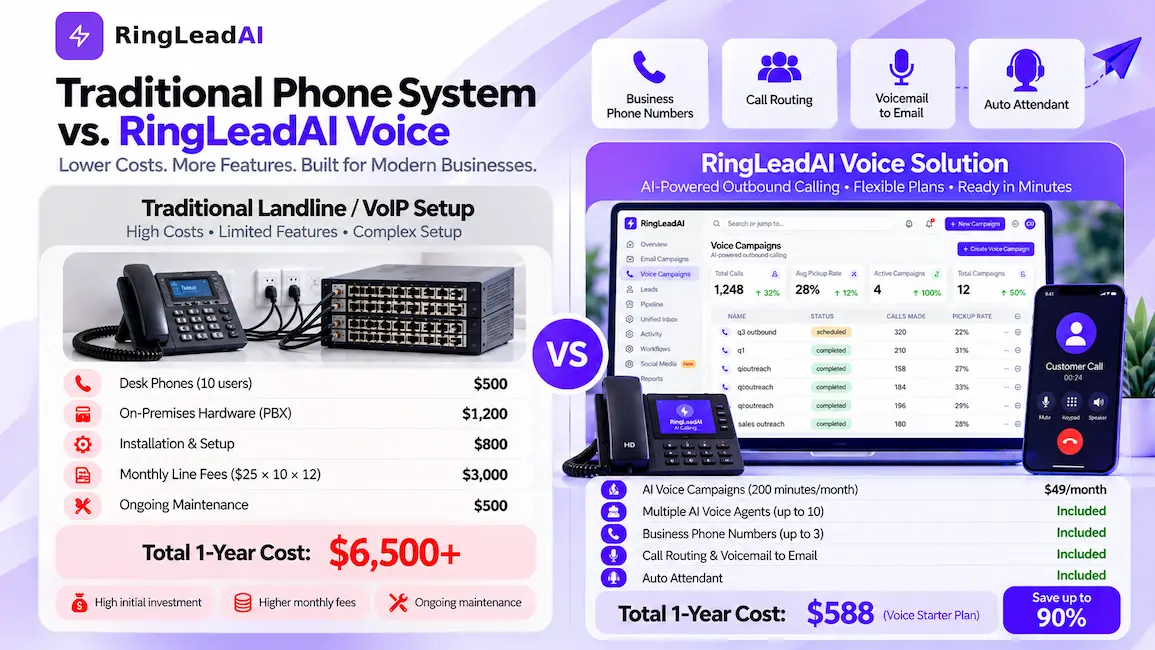
Your business could be paying 25–40% more for phone services than necessary by sticking with a traditional landline. Switching to Voice over Internet Protocol (VoIP), which lets you make business calls over an internet connection, can reduce communication costs while giving your team more flexibility.
#The Hidden Costs of Staying Put
Traditional landlines come with costs and limitations that are easy to overlook. You may pay separate fees for each line, expensive hardware, and additional calling charges, yet still lack mobile access, call analytics, and customer relationship management (CRM) integrations. These limitations become more expensive when employees work remotely or need to handle customer calls away from the office.
In 2026, a phone system tied to a physical desk can hold your business back. Employees need to answer calls from different locations, managers need visibility into call performance, and customers expect reliable service. A legacy landline makes these requirements harder to manage, often without delivering better call quality or value.
#What This Guide Delivers
Choosing a VoIP provider is not simply about finding the lowest advertised price. The right system must fit your team's size, calling habits, budget, and day-to-day workflow.
This guide compares seven VoIP phone systems for small businesses in 2026, covering:
- Pricing and features: Compare plans, calling options, and essential business tools side by side.
- AI capabilities: Identify useful automation features and separate practical benefits from marketing claims.
- CRM integrations: See how providers connect calls with customer records and existing business software.
- Total cost of ownership: Understand the additional costs of hardware, number porting, international calls, and usage overages.
- Choosing the right provider: Follow a practical decision framework based on your business requirements rather than feature counts alone.
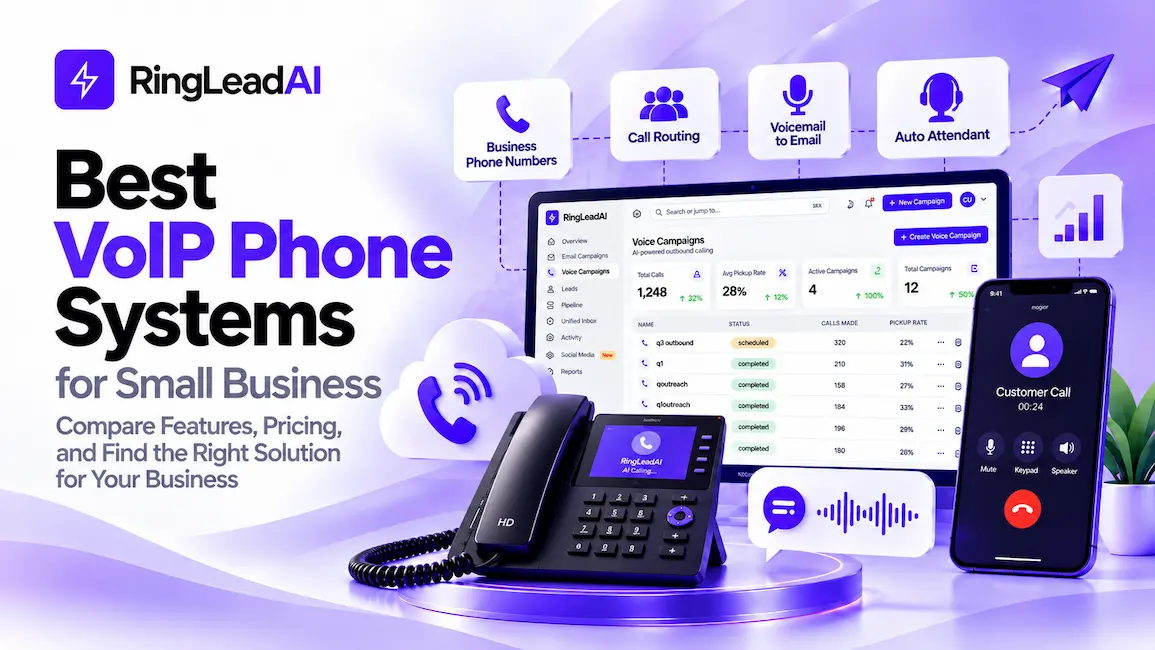
The comparison is designed to help small business owners, operations managers, and startup founders make an informed decision without getting lost in telecom jargon.
Our evaluation approach: Provider assessments should be grounded in hands-on testing, documented pricing and features, dated sources, and a transparent comparison methodology. Pricing and plan inclusions can change, so verify the latest terms before signing a contract. The goal is to assess what each system actually offers, where it falls short, and whether the cost makes sense for a small business.
#How We Evaluated Providers: Our Testing Methodology
#Why Transparency Matters in VoIP Comparisons
Choosing a VoIP phone system based on advertised features alone can lead to the wrong decision. A low monthly price may exclude essential features, require an annual contract, or come with additional charges that increase the actual cost.
This comparison uses eight evaluation criteria to assess pricing, features, setup, call quality, AI capabilities, integrations, customer support, and scalability. The aim is to make the differences between providers clear and explain what matters most to a small business.
Our methodology also recognizes the limits of the available evidence. Hands-on testing, published specifications, official pricing pages, and independent research are not interchangeable. Each supports a different type of conclusion, and we distinguish between them rather than presenting unverified assumptions as test results.
#Evaluation Criteria: The Eight Factors We Scored
#1. Pricing Transparency
We examined whether providers publish clear per-user, per-month pricing or require businesses to contact sales for a quote. We also considered annual contract requirements, minimum user counts, and additional charges that can affect the final bill.
A strong provider makes it easy to understand what each plan includes before signing up. Essential features should be clearly identified, and any additional charges, taxes, hardware costs, or usage fees should be disclosed. We also considered whether monthly billing is available for businesses that want flexibility.
#2. Feature Set and Depth
We assessed the availability of essential business calling features, including auto-attendants, call routing, voicemail-to-email, business texting, and mobile apps. An auto-attendant answers incoming calls and directs callers to the right person or department without requiring a receptionist to handle every call.
We also considered where these features sit within the pricing structure. A feature included in the entry-level plan offers different value from one that requires a more expensive subscription.
Advanced capabilities received separate consideration, including AI transcription, post-call summaries, sentiment analysis, and skills-based routing. These features can help businesses manage customer conversations, but their value depends on the team's actual needs and the plan's cost.
#3. Ease of Setup Without IT Staff
Small businesses should not need a dedicated IT team just to start making calls. We considered the steps involved in moving from account registration to a working phone system, including number setup, user creation, device configuration, and call routing.
We also looked for guided onboarding, auto-provisioning of desk phones, and straightforward administration dashboards. Auto-provisioning automatically configures compatible phones with the required settings, reducing manual setup.
A strong provider lets a non-technical business owner add users, change call routing, and manage voicemail without repeatedly contacting support. Where setup times have not been measured directly, they should be treated as estimates rather than verified test results.
#4. Call Quality and Reliability
Call quality can determine whether a phone system is worth keeping. We considered voice clarity, delay, dropped calls, and the provider's published reliability commitments.
A thorough test should cover local and long-distance calls, different internet connections, and busy periods. It should also record the testing environment, including the internet connection and device used, so the results can be interpreted fairly.
We also examined available uptime guarantees and guidance on Quality of Service (QoS), a set of network practices that prioritizes voice traffic to reduce delays and interruptions.
Expert tip: Test your internet connection before blaming a VoIP provider for poor call quality. Monitor latency (the time data takes to travel), jitter (variation in that delay), and packet loss (data that fails to reach its destination). A tool such as PingPlotter can help identify network problems over time. Run tests during the hours your team normally makes calls, and remember that a stable connection matters as much as raw download speed.
#5. AI Capabilities
We evaluated AI features by their practical value rather than by the number of AI-related claims in a provider's marketing.
Real-time transcription converts speech into text during a conversation, while post-call summaries provide a shorter record of what was discussed. These tools can reduce note-taking and help employees follow up with customers.
Sentiment analysis attempts to identify the emotional tone of a conversation. Skills-based routing directs calls to employees based on their expertise or other defined criteria. These capabilities may be more useful for customer-facing teams that handle high call volumes than for businesses that mainly need basic calling.
We also considered whether AI tools are included in standard plans or sold as premium add-ons. Transcription accuracy should be tested against actual recordings where possible, with results interpreted in light of accents, background noise, and call conditions.
#6. CRM and Business Tool Integrations
We examined how well each provider connects with customer relationship management (CRM) platforms and other business tools. CRM software stores customer information and helps teams track interactions, sales opportunities, and follow-ups.
The depth of an integration matters. A native, bidirectional integration can exchange information between the phone system and a CRM, while a simpler integration may support only limited actions or require a third-party service such as Zapier.
We considered supported platforms, the information exchanged, setup requirements, and the pricing tier needed to access each integration. A useful integration should reduce manual work rather than introduce another system that employees must maintain.
#7. Customer Support Quality
When business calls stop working, slow support can cost money and damage customer relationships. We considered the available support channels, published operating hours, response commitments, and any restrictions based on subscription level.
A complete hands-on assessment would contact support before committing to a plan, record the time taken to receive a response, and note whether the issue was resolved. Chat and phone support should be assessed separately because availability and response times may differ.
We also considered whether support is available around the clock and whether the provider clearly explains its support arrangements. Specific response times should only be published when they have been recorded during actual tests. If a provider has not been contacted, its support quality should be described using documented evidence rather than assumed from its marketing.
#8. Scalability
A phone system should continue to work as a business grows from one employee to 50. We assessed whether providers make it straightforward to add users, manage multiple locations, support remote workers, and obtain international numbers where needed.
We also considered volume discounts, plan restrictions, and whether expanding the account requires a sales call. Some businesses need only a few users today but expect to add employees over the next year. Others need to manage separate departments or locations from one administrative dashboard.
A strong option makes growth manageable without forcing businesses to pay for enterprise features they do not yet need.
#What We Did Not Test
No comparison can cover every possible business scenario, and the limits of this evaluation matter when interpreting the results.
- International calling: We did not exhaustively test every provider's international calling rates or every destination. Businesses with frequent overseas calls should check destination-specific rates and included allowances.
- High-volume call loads: We did not conduct formal load tests simulating 50 simultaneous calls across every provider. Published capacity and general scalability claims should not be mistaken for independently verified performance under that workload.
- Enterprise compliance: We did not evaluate enterprise-level compliance requirements, including HIPAA or PCI-related controls, in depth. Businesses handling regulated health or payment information should verify the provider's applicable safeguards and contractual commitments.
- Every hardware configuration: Compatibility and performance can vary by desk phone, headset, mobile device, router, and internet connection. Results from one configuration may not apply to another.
- Long-term reliability: Short-term checks cannot establish how consistently a service performs over months or years.
These limitations do not make a comparison useless. They establish what the available evidence can support and where a business should conduct its own checks before committing.
Our standard is straightforward: Verified test results should be identified as tests, published specifications should be attributed to the provider, and untested claims should remain unverified. This gives small businesses a more reliable basis for comparing costs, understanding trade-offs, and choosing a phone system that fits their requirements.
VoIP Buyer's Guide
#Side-by-Side Comparison: All Recommended Providers
The best VoIP phone system depends on your budget, team size, and the features you actually use. Use this comparison to shortlist two or three options before reading detailed reviews.
Note: Prices are indicative figures and should be verified against current provider pricing before purchase.
| Provider | Best For | Starting Price (user/mo) | Key Features | AI Capabilities | CRM Integrations | Free Trial |
|---|---|---|---|---|---|---|
| Nextiva | Businesses wanting calls, texts, and customer communication in one platform | $23 | Auto-attendant, call routing, business texting, mobile and desktop apps, voicemail-to-email | Transcription and post-call summaries (depends on plan) | Salesforce, HubSpot | Verify availability |
| RingCentral | Teams needing unified communications and call analytics | $30 | Business calling, messaging, video meetings, team chat, call analytics | AI transcription, sentiment analysis, analytics | Salesforce, HubSpot, Slack, Teams (plan dependent) | Verify availability |
| Dialpad | Businesses prioritizing AI transcription and call coaching | $27 Std / $35 Pro | Business calling, SMS, live transcription, call routing, mobile/desktop apps | Real-time transcription, summaries, sentiment analysis, call coaching | Varies by plan (verify Salesforce/HubSpot) | Verify availability |
| Zoom Phone | Budget-conscious teams already using Zoom | $12 Met. / $18 Std | Business calling, call routing, voicemail, business texting, Zoom Meetings integration | Transcription and summaries through eligible Zoom AI Companion | Salesforce, HubSpot, Slack (plan dependent) | Verify availability |
| Ooma Office | Very small businesses needing basic business calling | $19.95 | Auto-attendant, call routing, voicemail-to-email, desk phone support | Advanced transcription may require an add-on | Depends on plan and setup | Verify availability |
| GoTo Connect | Businesses seeking a combined phone and meeting platform | Custom pricing | Auto-attendant, call routing, video meetings, team chat, desktop/mobile apps | AI features depend on current offering | Check supported integrations | Verify availability |
| Yealink Desk Phones | Desk-based teams that prefer physical business phones | $89–$489 (one-time) | Physical desk phones, HD audio, auto-provisioning, PoE support on select models | Not applicable (Hardware only) | Depends on connected phone system | N/A |
#How to Use This Comparison
- Choose Nextiva: If you want to manage business calls and customer communications through one unified platform.
- Consider RingCentral: If team messaging, robust video meetings, and deep call analytics are high priorities.
- Compare Dialpad: If live AI transcription, instant call notes, and real-time coaching are critical for your team.
- Look at Zoom Phone: If your team is already accustomed to Zoom and wants to minimize overall costs.
- Consider Ooma Office: If your requirements are straightforward and you simply need reliable, basic calling.
- Request GoTo Connect: If you want an integrated communications suite and can work with tailored, custom quotes.
- Buy Yealink Hardware Separately: Only when you specifically need physical desk devices. Note that Yealink is an equipment manufacturer, not a standalone VoIP provider.
#Before You Decide
The advertised starting price is rarely the exact figure you will pay. Be sure to check:
- Annual billing commitments vs. monthly rates
- Minimum user limits per account
- Taxes, regulatory fees, and international rates
- Tier upgrades required for CRM integrations & AI tools
Always confirm trial eligibility, hardware compatibility, and feature access limits directly with the provider before committing.
Nextiva: Best Omnichannel Platform for Combining Calls, Texts, and CRM
Best for: Small businesses that want business calls, texting, and customer management in one platform without managing several separate tools.
#Overview
Nextiva is a strong option for small businesses that need more than a basic phone system. It combines business calling, messaging, and team communication tools in one platform, making it easier to manage customer interactions across different channels.
For businesses with 5–50 employees, this setup can reduce the need to switch between separate applications. However, not every feature is included in the entry-level plan. Before signing up, check which subscription includes the CRM integrations, analytics, and AI tools your team needs.
#Key Features
- Auto-attendant and call routing: Automatically directs incoming calls to the right employee or department.
- Business texting: Supports customer communication through business messaging, subject to plan and messaging limitations.
- Mobile and desktop apps: Allows employees to handle business calls away from their desks.
- Voicemail-to-email: Helps employees review voicemail messages and, where supported, their transcriptions through email.
- Team chat and video meetings: Provides additional communication tools, with availability depending on the plan.
- Call analytics and reporting: Helps managers monitor call activity and assess team performance.
#Pricing Tiers
The supplied research lists Nextiva's starting price at $23 per user per month. Higher-tier plans may include additional integrations, reporting capabilities, and administrative features.
The entry price should not be treated as the final cost for every business. Confirm the current billing terms, contract requirements, included features, and any additional charges before choosing a plan.
#Pros
- Published starting prices make initial budgeting easier.
- Combines voice, messaging, and other team communication tools.
- Offers mobile and desktop access for remote and hybrid teams.
- Supports business growth as more employees need phone access.
- Provides integrations with customer management platforms, subject to plan requirements.
#Cons
- Advanced AI capabilities may not match Dialpad's focus on real-time transcription and call coaching.
- Some CRM integrations and advanced features may require a higher-priced subscription.
- The administration dashboard may take time to learn.
- The actual cost can rise when you add users or pay for features missing from the entry-level plan.
#Final Verdict
Nextiva is the strongest choice for small businesses that want calls, texts, and customer communication managed through one platform. Its main advantage is the combination of communication tools, rather than any single standout feature.
However, businesses that prioritize AI-driven call analysis should compare it closely with Dialpad. Before committing, test the administrative dashboard, confirm the CRM features included in your preferred plan, and calculate the total monthly cost for your team.
## RingCentral: Best for AI-Powered Unified Communications and Team Analytics
Best for: Small and growing businesses that need business calling, team collaboration, and detailed call analytics in one platform and are willing to pay more for those capabilities.
### Overview
RingCentral combines business calling, messaging, video meetings, and team collaboration in one communications platform. Its main advantage is the breadth of tools available to businesses that want to manage internal communication and customer calls without switching between multiple services.
For customer-facing teams, its analytics and AI capabilities can help managers review conversations, identify trends, and monitor team performance. However, smaller businesses that only need reliable calling may find the additional features unnecessary.
#Key Features
- Unified communications: Brings business calls, SMS, messaging, and video meetings together, with availability depending on the plan.
- Team collaboration: Provides team chat, video meetings, and other tools for coordinating work.
- Call analytics and reporting: Helps managers review call activity and assess performance through reporting dashboards.
- AI-powered tools: Available AI capabilities may include transcription, conversation insights, and sentiment analysis, depending on the product and subscription.
- Mobile and desktop apps: Allows employees to handle business communications across supported devices.
- Third-party integrations: Connects with business applications, including CRM platforms and collaboration tools, subject to compatibility and plan requirements.
### Pricing Tiers
The supplied research lists RingCentral's starting price at $30 per user per month, making it the most expensive entry-level option in the comparison as presented.
That higher starting price may be justified if your team uses the additional collaboration, reporting, and AI tools. However, do not assume every advanced feature is included in the base subscription. Confirm the current plan structure, billing terms, contract requirements, and any additional charges before comparing the total cost with alternatives.
### Pros
- Broad range of business communication and collaboration tools.
- AI and analytics capabilities for teams that need better visibility into customer conversations.
- Mobile and desktop access for employees working across locations.
- Integrations with commonly used business applications, subject to plan availability.
- Can support businesses as they grow and require more advanced communication tools.
### Cons
- The listed starting price of $30 per user per month is higher than the other service providers in this comparison.
- The number of features may be excessive for very small teams with straightforward calling needs.
- Some advanced tools and integrations may require higher-priced plans.
- Annual billing or contract terms may affect the price and flexibility available.
### Final Verdict
RingCentral is worth considering if you need a broader communications platform with team collaboration and call analytics built into the same service. The higher starting price is a trade-off: you may get more useful tools, but only if your employees actually use them.
If your main priority is AI-powered transcription and call coaching, compare it directly with Dialpad. If keeping costs low matters more than advanced analytics, Zoom Phone or Ooma Office may be more appropriate.
Before signing up, confirm which AI and CRM features are included in your chosen plan and calculate the total monthly cost for your team.
Dialpad: Best for AI-Driven Call Coaching and Transcription
#Overview
Dialpad is a strong choice for businesses that want AI built into their phone system rather than offered as an expensive extra. Its features include real-time call transcription, automatic post-call summaries, sentiment analysis, and AI-assisted call coaching. These tools can help sales and support teams review conversations, identify areas for improvement, and spend less time on manual documentation.
For small businesses that handle customer calls every day, Dialpad offers a practical way to turn conversations into useful performance insights.
#Key Features
- Real-time call transcription: Converts spoken conversations into text while the call is happening.
- Automatic call summaries: Generates summaries after calls, helping teams review important points and follow-up tasks.
- Sentiment analysis: Estimates customer sentiment from conversations, although results can vary with audio quality and context.
- AI call coaching: Provides conversation insights and feedback to help sales and support teams improve their approach.
- Calling and SMS: Includes unlimited calling and text messaging on eligible Standard plans, subject to the plan's terms.
- Mobile and desktop apps: Lets employees handle business calls from different devices.
#Pricing Tiers
Dialpad Standard is listed in the supplied pricing research at $27 per user per month, while Pro is listed at $35 per user per month. These prices should be verified against Dialpad's current pricing page before purchasing.
The Standard plan covers core calling features and live transcription. Pro adds higher-tier capabilities, including CRM integrations such as Salesforce and HubSpot, advanced analytics, and additional support options. Check the current plan details carefully because feature availability and billing terms can change.
#Pros
- Strong AI transcription and call-coaching capabilities.
- Unlimited calling and SMS on eligible Standard plans.
- Clear pricing tiers make it easier to compare costs.
- Mobile and desktop apps support employees working in different locations.
- Live transcription can help with training, documentation, and call reviews.
#Cons
- Salesforce and HubSpot integrations may require the Pro plan.
- Its feature set may be less suitable for businesses prioritising a broader omnichannel platform.
- Sentiment analysis is an estimate, not a definitive measure of customer emotion.
- Some users may find the administration interface less intuitive than competing platforms.
#Best For
Dialpad is best for sales teams, customer support departments, and other customer-facing businesses that want call transcription, AI-generated summaries, and coaching tools. It is particularly useful when managers need to review conversations and identify ways to improve customer interactions.
#Expert Tip
Evaluate AI features against your actual workflow before paying for a higher tier. Real-time transcription and call summaries can benefit many businesses, while sentiment analysis and advanced coaching are more valuable for teams that regularly review customer conversations. Choose the plan that supports the features your team will genuinely use.
Final Verdict: Dialpad deserves serious consideration if AI-powered calling is a priority. However, compare the total monthly cost and plan restrictions before deciding. CRM access, advanced analytics, and support options can affect the value of the package, so confirm exactly what is included in each tier.
Zoom Phone: Best Low-Cost Entry for Growing Teams
#Overview
Zoom Phone is a practical option for businesses that want a phone system without paying for a large communications platform. Its metered plan has a lower starting price than the unlimited-calling option, making it worth considering for teams with low outbound call volumes.
The main advantage is its integration with Zoom Meetings and Zoom Chat. If your team already uses Zoom for daily communication, adding phone service can keep calls, meetings, and collaboration in one familiar environment.
#Key Features
- Zoom integration: Connects business calling with Zoom Meetings and Zoom Chat.
- Call management: Includes call routing, voicemail, and other core business phone features.
- Business texting: Supports messaging where included in the selected plan and region.
- Metered calling: Provides an option for businesses that make relatively few outbound calls.
- Mobile and desktop apps: Lets employees manage business calls across supported devices.
- AI Companion: Offers AI capabilities such as meeting or conversation summaries and transcription where supported by the product, plan, and settings.
#Pricing Tiers
Based on the supplied pricing research, Zoom Phone offers two options:
- Metered — $12 per user per month: Outbound calls are charged by usage, so the final cost depends on how much your team calls.
- Standard — $18 per user per month: Includes unlimited calling within the applicable plan's supported destinations and terms.
Verify current prices, calling allowances, and contract conditions on Zoom's official pricing page before making a decision. A lower starting price does not automatically mean a lower bill: frequent outbound calls can make a metered plan more expensive than an unlimited option.
#Pros
- Low advertised entry price for businesses with light calling needs.
- Strong integration with Zoom's meeting and chat tools.
- Familiar interface for teams already using Zoom.
- Mobile and desktop apps support remote and hybrid work.
- Offers a choice between metered and unlimited calling models.
#Cons
- Per-minute charges can increase costs for teams making frequent outbound calls.
- AI capabilities may not match the specialised call-coaching features offered by providers such as Dialpad.
- CRM integration depth and availability should be checked against your chosen plan.
- Businesses needing advanced phone management may require features beyond the basic package.
#Best For
Zoom Phone is best for small and growing teams that already rely on Zoom and want to add business calling without introducing another major communications platform. It is particularly suitable for remote-first businesses with relatively low outbound call volumes.
#Expert Tip
Estimate your monthly outbound minutes before choosing a plan. Compare the metered option's base fee plus expected usage charges against the unlimited plan's monthly cost. Also check whether your most important features, such as CRM integration, call recording, and AI summaries, are included in your selected package.
Final Verdict: Zoom Phone is a sensible low-cost starting point for businesses already using Zoom. Its value depends on call volume and feature requirements, so compare the complete monthly cost rather than choosing solely on the advertised entry price.
Ooma Office: Best Entry-Level VoIP for Very Small Businesses
#Overview
Ooma Office is a practical choice for very small businesses that want to replace a traditional landline with a straightforward business phone system. It focuses on essential calling features rather than an extensive set of AI and collaboration tools.
For businesses with one to ten employees, this simpler approach can make setup and day-to-day management easier. Retail shops, solo professionals, and small service companies may find it a better fit than paying for a platform packed with features they rarely use.
#Key Features
- Auto-attendant: Greets callers and directs them to the appropriate person or department.
- Call routing: Helps send incoming calls to the right destination.
- Voicemail-to-email: Delivers voicemail messages to an email inbox for easier access.
- Desk phone support: Supports compatible IP desk phones, depending on the device and setup requirements.
- Mobile app: Allows employees to handle business calls away from the office.
- Call management: Provides core tools for managing incoming and outgoing business calls.
#Pricing Tiers
Ooma Office is listed in the supplied pricing research at $19.95 per user per month for its entry-level offering. Higher tiers may include additional capabilities, such as call recording and more advanced reporting or analytics.
Check Ooma's current pricing and plan details before signing up. Confirm whether taxes, hardware, number porting, international calls, and optional features affect the total cost. Also verify which desk phones are compatible with your chosen setup rather than assuming every existing device will work.
#Pros
- Straightforward entry-level pricing.
- Designed for businesses that want a simple phone system.
- Supports compatible desk phones as well as app-based calling.
- Includes essential features such as voicemail and call routing.
- Can suit businesses that do not need extensive AI or collaboration tools.
#Cons
- Fewer AI-driven calling features than platforms such as Dialpad.
- CRM integrations and advanced capabilities may be more limited or plan-dependent.
- Businesses with complex workflows may outgrow its simpler feature set.
- Call recording and advanced analytics may require a higher-tier plan or additional service.
#Best For
Ooma Office is best for very small businesses that need a straightforward landline replacement without managing a complex communications platform. It is worth considering for local retailers, independent professionals, and small service businesses where reliable everyday calling matters more than advanced AI or detailed call analytics.
#Final Verdict
Ooma Office is a sensible option when simplicity is the priority. However, businesses expecting rapid growth or needing sophisticated CRM workflows, AI call coaching, and detailed performance analytics should compare it with more feature-rich providers before committing.
GoTo Connect: Best for Ease of Use and Simple Setup
#Overview
GoTo Connect is worth considering for businesses that want a phone system that is straightforward to manage. Its unified platform combines business calling with tools such as video meetings and team messaging, helping employees handle everyday communication in one place.
For small businesses without dedicated IT staff, ease of administration can be an important buying factor. However, claims about setup speed and dashboard usability should be judged against your team's needs and experience rather than assumed to be the same for every business.
#Key Features
- Auto-attendant and call routing: Directs incoming calls to the right person or department, with configurable call flows.
- Video meetings and team messaging: Supports internal communication alongside business calling, depending on the selected plan.
- Mobile and desktop apps: Allows employees to manage calls across supported devices.
- Call analytics and reporting: Helps businesses review calling activity and monitor performance.
- Administration tools: Provides a central place to configure phone settings, users, and call flows.
#Pricing Tiers
GoTo Connect uses custom pricing, and a standard per-user monthly rate is not provided in the supplied research. Businesses may need to contact its sales team to obtain a quote.
This makes direct price comparisons harder. Before agreeing to a plan, request an itemised quote covering per-user charges, included features, phone numbers, hardware, support, and any setup fees. Also ask how costs change when you add users or need advanced features.
#Pros
- Combines business calling with collaboration tools.
- Offers configurable call routing and administration features.
- Mobile and desktop apps support different working arrangements.
- Analytics and reporting can help managers review calling activity.
- May suit teams that prefer a consolidated communications platform.
#Cons
- Custom pricing makes it difficult to compare costs without requesting a quote.
- AI capabilities and availability should be checked against the selected package.
- Third-party integrations may not cover every business's requirements.
- The full value depends on which calling and collaboration features are included in the quote.
#Best For
GoTo Connect is best for businesses that want calling and team communication in one platform and are comfortable speaking with sales before making a purchase. It may suit teams that value centralised administration and want to reduce the number of separate communication tools they manage.
#Final Verdict
GoTo Connect deserves consideration if its combination of phone and collaboration features fits your workflow. Its main drawback for price-conscious buyers is the lack of a clear published per-user rate in the supplied research. Request a written, itemised quote and compare it with providers offering transparent pricing before deciding.
#Yealink Desk Phones: The Hardware Pick for Desk-Based Teams
#Overview
Yealink is worth considering for businesses that prefer physical desk phones over making every call through a computer or mobile app. Its range includes basic office handsets and more advanced models with larger displays and additional calling features.
One important distinction: Yealink sells phone hardware, not a complete VoIP phone service. You still need a compatible VoIP provider and service plan. Some providers support automatic provisioning, which lets administrators configure compatible phones remotely instead of setting up every device manually. However, compatibility and setup requirements vary by provider and model.
#Key Features
- HD audio: Supported models offer high-definition voice features when the network and service provider support them.
- Auto-provisioning: Compatible phones can receive configuration settings from supported VoIP providers.
- Power over Ethernet (PoE): Selected models can receive power and network connectivity through a single Ethernet cable, provided the network equipment supports PoE.
- Different handset options: The range includes entry-level phones for basic calling and higher-end models with additional features.
- Provider compatibility: Some Yealink devices work with multiple VoIP services, but support depends on the exact model, firmware, and provider requirements.
#Pricing
The supplied research lists Yealink desk phones at approximately $89 to $489, depending on the model. These are one-time hardware costs rather than recurring per-user service fees. Actual prices vary by retailer, configuration, and availability, so confirm the current price before purchasing.
Most small businesses do not need the most expensive handset for every employee. A basic model may be sufficient for general office use, while receptionists or employees who handle frequent calls may benefit from additional line keys or a larger display.
Remember to budget separately for the VoIP subscription, compatible networking equipment, and any required accessories.
#Pros
- Offers models for different budgets and office requirements.
- Selected models support HD voice and PoE.
- Compatible providers may offer automatic provisioning.
- Physical handsets suit employees who work at fixed desks.
- Reusing compatible existing phones can reduce upfront hardware costs.
#Cons
- Hardware costs are separate from recurring VoIP service fees.
- Physical phones are less convenient than softphones for employees who work remotely or move between locations.
- Higher-end models may offer features that many small businesses do not need.
- Compatibility is not universal; some phones may require specific firmware, configuration, or provider support.
#Best For
Yealink desk phones are best for desk-based teams that prefer dedicated handsets. They can suit offices, reception areas, retail locations, and businesses where employees regularly handle calls from a fixed workstation.
#Expert Tip
Check your existing hardware before buying new phones. Ask your VoIP provider whether your current Yealink, Cisco, Poly, or Grandstream models are supported and whether they can be provisioned automatically. Confirm the exact model and firmware requirements first. Reusing compatible equipment can reduce setup costs and avoid unnecessary purchases.
Final Verdict: Yealink is a hardware option for businesses that prefer physical desk phones, not a standalone alternative to a VoIP provider. Choose a handset based on your employees' actual calling needs, and compare the upfront device cost with the ongoing service fee before making a decision.
Pricing Breakdown and Total Cost of Ownership
#The Sticker Price Is Not the Real Price
The monthly price advertised by a VoIP provider is only the starting point. Your actual costs may also include desk phones, number porting, international calls, optional features, and usage charges. Understanding the total cost of ownership (TCO)—the full cost of running the system over time—helps you compare providers more accurately.
A low-cost plan may be ideal for a small team with light call volume. A more expensive plan may offer better value if it includes the features your business would otherwise pay for separately.
#Hidden Cost #1: Hardware
Desk phones are an upfront expense. The supplied research lists Yealink models at approximately $89 to $489 per device, depending on the model. A team of 10 employees could therefore spend $890 to $4,890 on handsets alone.
You can avoid this expense if your team uses compatible mobile and desktop apps instead of physical phones.
Expert Tip: Before buying new hardware, ask your VoIP provider whether your existing Yealink, Cisco, Poly, or Grandstream phones are supported. Some compatible devices can be provisioned automatically, potentially reducing equipment and setup costs. Always check the exact model and firmware requirements.
#Hidden Cost #2: Number Porting
Number porting is the process of transferring an existing business phone number to a new provider. Fees and timelines vary. Some providers include porting, while others may charge for particular requests or services.
Do not cancel your existing phone service before your new provider confirms the transfer arrangements. Poorly coordinated migrations can interrupt incoming calls.
Expert Tip: Get written confirmation of any porting fees, the expected transfer date, and the steps required from your current provider. Also check your existing contract's exit terms before starting the migration.
#Hidden Cost #3: International Calling
International calling can materially affect costs if you regularly contact customers or employees in other countries. Some plans include calls to specified destinations, while others charge per minute or require an additional calling package.
Do not assume that unlimited domestic calling includes international destinations. Check the provider's current rate card for the countries you call most often.
Expert Tip: Estimate your monthly international minutes and calculate the likely cost for each shortlisted provider. Compare the destinations and allowances included in the plan, not just the advertised starting price.
#Hidden Cost #4: Overage Fees and Add-Ons
Some plans have usage-based charges, while other features may cost extra. Depending on the provider and package, these could include additional phone numbers, call recording, advanced analytics, international calling, or extra storage.
Read the plan details carefully and ask for a breakdown of optional charges. A feature included in one provider's entry-level plan may require a higher tier with another.
#Hidden Cost #5: Annual vs. Monthly Billing
Annual billing may reduce the effective monthly price, but it can also require a larger upfront payment or a longer commitment. Monthly billing may cost more while offering greater flexibility.
Compare the actual billing terms, cancellation rules, renewal conditions, and any early termination charges. If your team is growing quickly or you may switch providers, flexibility can be worth paying for.
#One-Year and Three-Year Cost Comparison
The following projections use the monthly per-user prices in the supplied research. They show base subscription costs only for a 10-person team. Hardware, add-ons, taxes, international calls, and other variable charges are excluded unless stated.
TCO & Commitment Projections
#1-Year vs. 3-Year Total Base Cost Breakdown
Total ownership costs differ significantly over multi-year commitments. Review estimated base costs modeled on standard 10-user team deployments before factoring in hardware and usage charges.
| Provider | 1-Year Base Cost | 3-Year Base Cost | Pricing Model & Assumptions |
|---|---|---|---|
| Nextiva | $2,760 | $8,280 | $23/user/month (10 users) |
| RingCentral | $3,600 | $10,800 | $30/user/month (10 users) |
| Dialpad Standard | $3,240 | $9,720 | $27/user/month (10 users) |
| Zoom Phone Standard | $2,160 | $6,480 | $18/user/month (10 users) |
| Zoom Phone Metered | $1,440 + usage | $4,320 + usage | $12/user/month, plus applicable outbound fees |
| Ooma Office | $2,394 | $7,182 | $19.95/user/month (10 users) |
| GoTo Connect | Not confirmed | Not confirmed | Request a custom sales quote |
| Yealink Desk Phones Hardware | $890–$4,890 one-time | $890–$4,890 one-time | 10 phones @ $89–$489 each (hardware purchase only) |
Pricing Note: Calculations are based on supplied research figures, not independently verified live quotes. Always confirm each provider's current price, billing conditions, and plan inclusions before purchasing. Yealink hardware is an independent capital expenditure.
#Comparing Apples to Apples
The table illustrates why direct price comparison requires checking fine print:
- Zoom Phone Metered carries the lowest listed base subscription rate, but outbound call volume charges can drastically change the final monthly invoice.
- GoTo Connect operates primarily on customized corporate volume quotes, meaning true TCO cannot be accurately charted without direct vendor engagement.
- Yealink represents non-recurring hardware capital costs—never compare desk phones directly against recurring per-seat SaaS subscriptions.
#Budget Quick Estimator
Tailor these baseline figures to your actual team size.
Number of Users
Plan Rate ($/user/mo) Nextiva ($23/mo) RingCentral ($30/mo) Dialpad Std ($27/mo) Zoom Phone Std ($18/mo) Zoom Phone Met ($12/mo + usage) Ooma Office ($19.95/mo)
Optional Yealink Desk Phones None (Softphone only) Entry Level ($89/phone) Mid-tier Executive ($250/phone) High-end Video Deskphone ($489/phone)
Estimated 1-Year Total (with hardware): $2,760
Estimated 3-Year Total (with hardware): $8,280
#Must-Have VoIP Features for Small Businesses in 2026
The best VoIP phone system is not necessarily the one with the most features. It is the one that gives your team the calling tools it needs without adding unnecessary costs or complexity. Before comparing providers, separate essential features from advanced capabilities that only certain businesses will use.
#Core Features Every Small Business Needs
These features should form the foundation of your comparison. Check their availability, plan restrictions, and any additional charges before choosing a provider.
#Auto-Attendant
An auto-attendant is an automated receptionist that greets callers and directs them to the right person or department. It helps small businesses handle incoming calls professionally without requiring someone to answer every call manually.
Look for custom greetings, clear menu options, and the ability to change routing rules when your business hours or team structure changes.
#Call Routing
Call routing directs incoming calls according to rules such as business hours, department, or employee availability. It helps customers reach the right person and reduces unnecessary transfers.
For a small business without dedicated IT support, configurable routing tools are particularly useful. Check whether your chosen plan supports the routing rules your team actually needs.
#Voicemail-to-Email
Voicemail-to-email sends voicemail messages to an email inbox, often as audio attachments or text transcriptions. It helps employees review messages when they cannot answer calls.
Check whether transcription is included or charged separately. Feature availability can vary by provider and plan.
#Business Texting (SMS/MMS)
Business texting allows companies to send and receive messages through supported business numbers. It can be useful for appointment confirmations, customer updates, and follow-ups.
SMS refers to standard text messages, while MMS supports compatible multimedia messages. Before choosing a provider, confirm which messaging features are included, whether they support your region, and whether registration or usage charges apply.
#Mobile and Desktop Apps
Softphone apps let employees make and receive business calls using a computer or mobile device instead of a traditional desk phone. They are particularly useful for remote and hybrid teams.
Check app compatibility, call transfer options, notification controls, and how the system handles calls when employees switch devices. Test the workflow your team will use daily rather than relying only on feature lists.
#Call Analytics and Reporting
Basic call analytics include call logs, durations, and call volumes. These reports help managers understand when calls arrive, identify busy periods, and plan staffing.
Advanced features such as sentiment analysis, agent performance reporting, and coaching insights can be useful, but not every small business needs them. Start with the reporting that supports your actual operational decisions.
#AI Features Worth Considering in 2026
AI is becoming more common in business phone systems, but not every provider includes the same capabilities in every plan. Treat these features as requirements when they solve a real problem for your team—not simply because a provider advertises them.
#Real-Time Transcription
Real-time transcription converts a live conversation into text as the call happens. It can help employees follow discussions, document important details, and review conversations for training purposes.
Dialpad is listed in the supplied research as including live transcription on its Standard plan. Other providers may restrict similar capabilities by plan or product. Verify the current inclusions before comparing costs.
#Post-Call Summaries
Post-call summaries use AI to condense a conversation into key points, decisions, and potential follow-up actions. They can reduce manual note-taking and make it easier for employees to remember what needs to happen next.
Check whether summaries are available for phone calls specifically, rather than assuming that an AI feature designed for video meetings also covers business phone calls.
#Sentiment Analysis
Sentiment analysis uses AI to estimate the tone or emotional signals in a conversation. Customer support and sales teams may use it to flag potentially difficult interactions or identify calls for further review.
These results are estimates, not definitive readings of a customer's emotions. Audio quality, context, language, and the way a person communicates can affect accuracy. Use sentiment insights to support human judgment rather than replace it.
#Skills-Based Routing
Skills-based routing directs callers to employees based on their expertise, language, department, or other relevant criteria. It is more advanced than basic call routing and can help support teams with specialised agents.
A small retail business may not need this capability. A support operation handling different products, languages, or technical issues may find it valuable. Confirm whether the feature is available in your plan and whether it requires additional configuration.
#CRM Integrations: Native vs. Third-Party Workarounds
CRM integration matters because it determines how easily your phone system fits into your sales or customer support workflow. A native integration connects the phone system directly to a customer relationship management (CRM) platform, such as Salesforce or HubSpot. Depending on the integration, it may log calls, display customer records, and synchronise selected information automatically.
Third-party automation tools can connect services that do not have a suitable native integration, but they may introduce additional costs, configuration work, and points of failure.
Expert Tip: Do not stop at checking whether a provider lists your CRM as an integration. Ask whether the connection is native, which data synchronises, whether the sync works in both directions, and whether the feature requires a higher-priced plan. Test the specific workflow your employees need before committing.
#Feature Checklist for Your Business
Use this checklist to define your requirements before comparing providers. Select the features that apply to your business, then check them against each provider's current plan details.
{@body const requirements = [
{label:"Auto-attendant with custom greetings",group:"Core"},
{label:"Call routing by time, department, or availability",group:"Core"},
{label:"Voicemail-to-email",group:"Core"},
{label:"Business texting (SMS/MMS)",group:"Core"},
{label:"Mobile and desktop apps",group:"Core"},
{label:"Call logs, analytics, and reporting",group:"Core"},
{label:"Real-time call transcription",group:"AI"},
{label:"Automatic post-call summaries",group:"AI"},
{label:"Sentiment analysis",group:"Optional"},
{label:"Skills-based routing",group:"Optional"},
{label:"Native integration with your CRM",group:"Integration"},
{label:"Compatible desk phone support",group:"Hardware"},
{label:"International calling for required destinations",group:"Calling"}
]}
{@body const [checked,setChecked] = DIL.useState([])}
<box border radius="xl" padding={3} gap={3}>
<row align="center" justify="between">
<title size="lg">VoIP buying checklist</title>
<badge>{checked.length} of {requirements.length}</badge>
</row>
<box background="surface-tertiary" height="6px" radius="full" clip>
<box background="surface-inverted" height="6px" radius="full" width={${checked.length/requirements.length*100}%} />
</box>
{#each ["Core","AI","Optional","Integration","Hardware","Calling"] as group}
<text weight="medium">{group === "AI" ? "AI capabilities" : group === "Optional" ? "Advanced features (as needed)" : group === "Integration" ? "CRM integration" : group === "Hardware" ? "Hardware requirements" : group === "Calling" ? "International requirements" : "Core calling features"}</text>
{#each requirements.filter(r=>r.group===group) as item}
<checkbox key={item.label} checked={checked.includes(item.label)} onChange={v=>setChecked(old=>v?[...old,item.label].filter(x=>x!==item.label))}>{item.label}</checkbox>
{/each}
{/each}
<row gap={2}>
<button block onClick={()=>GenUI.copy("VoIP Buying Checklist\n"+requirements.map(r=>(checked.includes(r.label)?"[x] ":"[ ] ")+r.label).join("\n"))}>Copy checklist</button>
<button block variant="outline" onClick={()=>setChecked([])}>Reset</button>
</row>
#Final Recommendation
Start with the core calling features, then add AI, CRM, hardware, and international calling requirements based on how your business operates. A small team that mainly answers local calls may need a very different system from a sales team that depends on call summaries and CRM records.
Compare the full plan inclusions and total costs—not just the number of features advertised. The right system should meet your current needs while giving you a practical path to grow.
How to Choose the Right VoIP System: A Step-by-Step Guide
Choosing a VoIP phone system involves more than comparing monthly prices. You need a solution that fits your team, delivers reliable call quality, and includes the features you will actually use. Follow these steps to compare providers and avoid unexpected costs.
#Step 1: Assess Your Needs Before Comparing Providers
Start by defining your business requirements. Consider your team size, whether employees work in an office or remotely, your average call volume, and the features your team needs every day.
For example, a small office may need an auto-attendant and call routing, while a sales team may benefit more from CRM integration, call recording, and AI-powered call summaries.
Expert Tip: List your five must-have features before comparing providers. This keeps your shortlist focused on practical needs rather than features that add cost without delivering much value.
#Step 2: Test Your Internet Connection
VoIP calls travel over your internet connection, so network stability plays an important role in call quality. High latency can cause delays, while packet loss can lead to broken audio or dropped words.
Test your connection under normal working conditions and during busy periods. Tools such as PingPlotter can help monitor latency, packet loss, and connection stability. Also, check whether your router, Wi-Fi coverage, and available bandwidth can support simultaneous calls.
Expert Tip: Monitor your connection over time instead of relying on a single speed test. If you find recurring network problems, address them before switching phone providers. A different VoIP service cannot fully compensate for an unstable connection.
#Step 3: Shortlist Two or Three Providers
Use the comparison table above to identify two or three providers that match your budget, team size, and required features. Compare the plans themselves, not just the provider names, because important features and limits can vary by tier.
For each option, check the monthly price, included calling, mobile and desktop apps, CRM integrations, support availability, and contract requirements. Keep hardware costs separate from recurring subscription fees.
Expert Tip: Limit your initial shortlist to three providers. A focused comparison makes it easier to identify meaningful differences without spending time evaluating services that do not meet your requirements.
#Step 4: Sign Up for Trials and Make Real Calls
Provider reviews can help you create a shortlist, but they cannot tell you exactly how a system will perform in your business. Where free trials or demonstrations are available, use them to test the features your team will rely on.
During the trial, check:
- Call clarity and connection stability.
- Mobile and desktop app usability.
- Call transfers, routing, and voicemail.
- Admin dashboard and user management.
- CRM integrations and any AI features you plan to use.
- Performance during busy periods and on different devices.
Test local and long-distance calls where relevant, and confirm whether trial restrictions differ from the paid plan.
Expert Tip: Ask a few team members to test the system using their usual devices and workflows. Their feedback can reveal practical problems that a sales demonstration may not show.
#Step 5: Test Customer Support Before Signing
Support matters when calls stop working, users cannot log in, or number migration runs into problems. Before committing, contact the provider with a realistic technical or account question.
Evaluate how quickly the team responds, whether the answer is clear, and whether the representative explains the next steps. Confirm the support hours, available contact methods, and whether technical assistance is included in your chosen plan.
Expert Tip: Treat pre-sales support as one useful indicator, not a guarantee of future service. Ask specifically about response targets for technical issues and whether urgent problems can be escalated outside standard business hours.
#Step 6: Confirm Number Portability and Contract Terms in Writing
If you want to keep your existing business phone numbers, confirm that they can be transferred to the new provider. Number portability, also called number porting, allows you to move eligible numbers between phone services.
Before signing, request written details covering:
- Number porting eligibility, fees, and estimated timeline.
- Any temporary service limitations during migration.
- Contract length, renewal terms, and cancellation conditions.
- Early termination fees and refund policies.
- Setup charges, extra numbers, and paid add-ons.
- The process for adding or removing users.
Do not cancel your existing phone service until the provider confirms that the number transfer is complete and your new service is working.
Expert Tip: Get the migration timeline and all associated charges in writing. This helps you plan the transition and reduces the risk of unexpected costs or business disruption.
#Step 7: Ask These Questions Before Signing
Use the following questions when speaking with a provider's sales team. Request clear answers that match the exact plan you intend to purchase.
- What is the total monthly cost per user, including applicable taxes and fees?
- Is there a discount for annual billing, and what commitment does it require?
- What is the number porting process, how long does it usually take, and what does it cost?
- Are CRM integrations built into the platform or provided through a third-party service such as Zapier?
- Which AI features are included in this plan, and which require an upgrade or additional payment?
- What uptime commitment do you offer, and are service credits available for qualifying downtime?
- What support hours and contact options are available? Is 24/7 support included?
- Can I add or remove users directly from the admin dashboard, and how does billing change?
- Are call recording, international calling, and additional phone numbers included or charged separately?
Save the answers and compare them against your written quote and contract before making a decision.
#Red Flags to Watch For
Be cautious if a provider:
- Does not clearly explain its pricing or requires a sales conversation before sharing basic plan details.
- Charges extra for features you assumed were included, such as call routing or voicemail-to-email.
- Requires a long-term contract with unclear renewal conditions or substantial early termination fees.
- Gives vague answers about number portability, migration, or service interruptions.
- Promotes AI features without explaining their practical use, availability, or additional costs.
- Provides slow or unclear pre-sales support and cannot explain how technical issues are escalated.
- Makes uptime promises without clearly stating the applicable terms and any service-credit conditions.
A red flag does not automatically mean a provider is unsuitable, but it is a reason to ask more questions and get the details in writing.
#Make Your Final Decision
The right VoIP system is the one that meets your essential requirements at a predictable total cost. Compare your shortlisted providers using the same checklist, test the important features where possible, and review the contract before committing.
Do not choose a service simply because it has the most features or the lowest advertised price. Prioritise reliable calling, manageable administration, suitable support, and the flexibility to grow with your business.
VoIP Setup Considerations and Internet Requirements
Before choosing a VoIP phone system, make sure your internet connection, network equipment, and phone setup can support your team's needs. A little preparation can help prevent poor call quality, avoid unnecessary hardware costs, and make the transition easier.
#Internet Bandwidth Requirements
VoIP calls need sufficient bandwidth and a stable connection. A general planning estimate is around 100 kbps per concurrent call in each direction, although actual requirements vary by codec, provider, and network overhead.
For a team of 10 employees making five simultaneous calls, this estimate works out to approximately 500 kbps for voice traffic in each direction. You should also allow additional capacity for video meetings, file transfers, and other business applications.
Expert Tip: Test your connection during normal working hours and busy periods. Tools such as PingPlotter can help you monitor latency, jitter, and packet loss over time. Download speed alone does not guarantee good call quality: a slower, stable connection may perform better than a faster connection with frequent packet loss or delays.
#QoS Settings: Prioritising Voice Traffic
Quality of Service (QoS) is a network feature that prioritises selected traffic, such as voice calls, when your internet connection becomes busy. Properly configured QoS can help reduce audio interruptions when employees are downloading large files, streaming video, or using other bandwidth-intensive applications.
Many business-grade routers support QoS, but the configuration depends on your equipment and VoIP provider. Check the provider's network recommendations and ensure your router can prioritise the relevant voice traffic.
Expert Tip: If call quality deteriorates when your office network is busy, check your router's QoS settings and monitor network congestion. QoS can help manage traffic on your local network, but it cannot fix every problem, including congestion elsewhere on the internet or an unreliable connection from your ISP.
#Desk Phones vs. Softphones: Which Is Right for Your Team?
Your team does not necessarily need a physical phone for every employee. The best option depends on where people work, how they handle calls, and whether they prefer dedicated hardware.
Desk phones are physical devices designed for office desks and reception areas. They suit employees who handle frequent calls and prefer a traditional handset with dedicated buttons. Yealink desk phones can range from approximately $89 to $489 per device, depending on the model and features. Treat this as an indicative hardware estimate and check current prices before purchasing.
Softphones are applications that let employees make and receive business calls through a computer, tablet, or mobile device. They are useful for remote and hybrid teams and can reduce upfront hardware costs. Employees still need compatible devices, suitable headsets where appropriate, and a reliable internet connection.
A hybrid approach can work well for businesses with both office-based and remote employees. Receptionists and high-volume callers can use desk phones, while remote staff use softphone apps. Confirm that your selected provider supports the devices and features your team requires.
Expert Tip: Check compatibility before buying new desk phones. Some providers support automatic provisioning for selected Yealink, Cisco, Poly, and Grandstream models, which can simplify configuration. However, support varies by provider, device model, firmware, and configuration, so confirm compatibility before reusing existing equipment.
#Number Porting: What to Expect
Number porting allows you to transfer an existing business phone number to a new VoIP provider. The process often takes several business days, but the actual timeline depends on the provider, current carrier, number type, and whether your account information is correct. A transfer may take longer if additional documentation or corrections are required.
Porting fees also vary. Some providers include the service, while others may charge fees depending on the number or circumstances. Ask about the expected timeline, any charges, and how calls will be handled during the transition.
Expert Tip: Confirm number portability, porting fees, and contract exit terms in writing before signing. Start the process early and keep your existing service active until the transfer is confirmed complete. If continuity is important, ask both providers whether temporary call forwarding or another backup arrangement is available.
#Setup Timeline: What to Expect
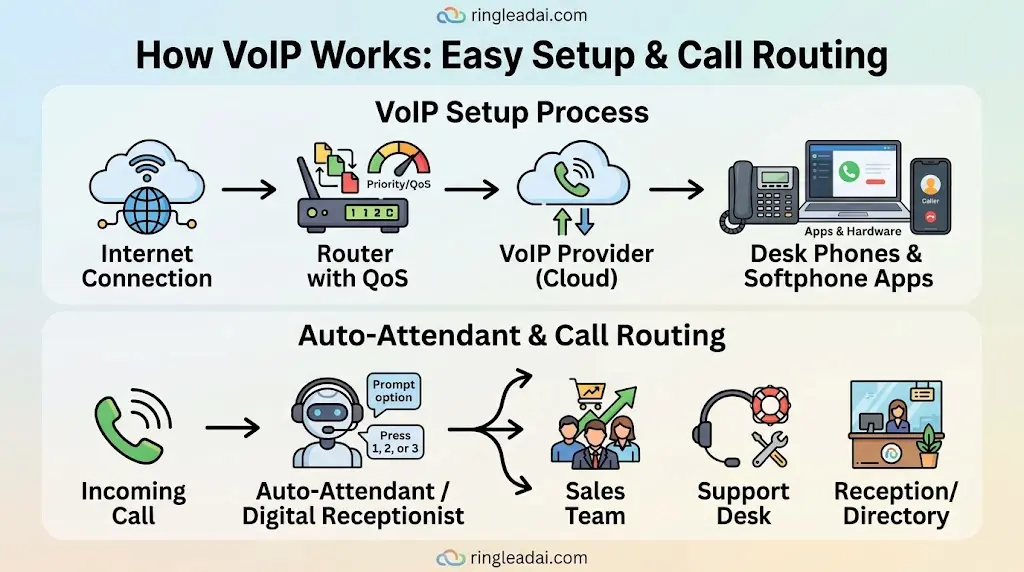
Getting a new VoIP system ready for its first call can be relatively quick when you are using softphones and setting up a small team. The full implementation may take longer if you need to configure multiple departments, install desk phones, integrate a CRM, or transfer existing numbers.
A typical setup involves these steps:
- Create the account: Select a plan, add business details, and configure the main phone number or temporary numbers.
- Add users: Create employee accounts and assign extensions or direct numbers.
- Configure call handling: Set up the auto-attendant, business hours, call routing, and voicemail.
- Connect devices: Install desktop or mobile apps, or connect and configure compatible desk phones.
- Test the system: Make inbound and outbound calls, test transfers and voicemail, and check audio quality across devices.
- Complete number porting: Transfer existing numbers when the provider confirms the required details and timeline.
Basic setup may be completed in under an hour in straightforward cases, but this is not a guarantee for every provider or business. Number porting and more complex configurations can take several days or longer.
For a fair comparison, measure setup time using the same criteria for each provider. Record how long it takes to create users, configure call routing, connect devices, and successfully make a test call. Do not publish exact provider-specific results unless you have actually tested them under comparable conditions.
Expert Tip: Before migration, write down your current call flow, business hours, extensions, and voicemail requirements. Recreating these settings in advance can reduce confusion and help your team move to the new system with fewer interruptions.
The goal is not simply to get a phone system running quickly. It is to ensure calls reach the right people, the audio remains clear, and your business can continue operating during the transition.
#AI in VoIP: What Is Genuine vs. Hype in 2026
#The AI Landscape Has Shifted
AI is becoming an important part of business phone systems, but not every provider offers the same capabilities or includes them in its standard plans. Features such as call transcription, automated summaries, and conversation analytics can help teams save time and improve customer service. However, availability often depends on the provider, subscription tier, and specific product.
The key is to separate practical tools from marketing claims. An AI feature is worth paying for when it solves a real problem, fits your team's workflow, and produces results you can evaluate.
#AI Features That Are Genuinely Useful
#Real-Time Transcription
Real-time transcription converts spoken conversations into text as a call takes place. It can help employees follow discussions, capture important details, and review conversations without relying entirely on handwritten notes.
For sales and support teams, searchable transcripts can also help with training and quality reviews. Dialpad is worth considering if live transcription is a priority, but confirm which plan includes it and whether any usage limits apply.
#Post-Call Summaries
Post-call summaries use AI to turn a conversation into a shorter record of its main topics, decisions, and next steps. This can reduce manual note-taking and make it easier to update customer records after a call.
The feature is especially useful for employees who handle many calls each day. However, AI-generated summaries can omit details or misinterpret a conversation, so employees should review important information before using it for customer commitments or business decisions.
#Sentiment Analysis
Sentiment analysis attempts to identify positive, negative, or changing emotional signals in a conversation. Customer-facing teams may use it to flag calls that need review, identify recurring complaints, or support agent coaching.
It should be treated as an indicator rather than a reliable measurement of a customer's actual feelings. Sarcasm, accents, background noise, and context can affect the result. Small teams with limited call volumes may get more value from reviewing a few calls manually.
#Skills-Based Routing
Skills-based routing directs incoming calls to agents based on factors such as their expertise, language, department, or availability. When supported by AI, the system may use additional information to help determine where a call should go.
This can benefit support teams handling different products or complex customer enquiries. For a small business where every employee handles most types of calls, a straightforward auto-attendant and call-routing setup may be sufficient.
#AI Features That Need Careful Evaluation
#Advanced AI Call Coaching
AI call coaching can analyse conversations and provide feedback on factors such as speaking patterns, adherence to a script, or how well an employee follows a sales process. The practical value depends on the quality of the analysis and whether the feedback helps employees improve.
Do not judge a coaching tool by a score alone. Ask for examples of its recommendations, how managers can review them, and whether the system supports your team's actual sales or service workflow.
#Predictive Dialling and Automated Outreach
Predictive dialling uses algorithms to coordinate outbound calls, while automated outreach can use software or AI to contact prospects and customers. These capabilities may help businesses with high-volume outbound operations, but they can be unnecessary for a small team that makes relatively few calls.
Before paying for these features, consider customer experience, consent requirements, applicable telemarketing rules, and how the system handles opt-outs. Automation should improve a legitimate workflow, not simply increase the number of calls made.
#Voice Biometrics and Advanced Security
Voice biometrics attempts to identify or authenticate a person using characteristics of their voice. Although it may be relevant in specialised security environments, most small businesses should first focus on essential protections such as multi-factor authentication, access controls, secure account recovery, and appropriate data retention.
Do not purchase voice-based authentication simply because it is marketed as AI-powered security. Evaluate the specific threat it addresses, how the technology handles errors, and whether the additional cost is justified.
Frequently Asked Questions
#Can I keep my existing business number?
Yes, in most cases. Number porting allows you to transfer an eligible business number to a new VoIP provider. The process often takes several business days, although the exact timeline depends on your current carrier, provider, and number type. Some providers may charge porting fees.
Confirm eligibility, costs, and the expected transfer date in writing. Keep your existing service active until the transfer is complete.
#Do I need special phones for VoIP?
No. You can use a softphone, which is an application installed on your computer or mobile device, instead of buying a physical phone. This can reduce upfront hardware costs.
If you prefer desk phones, check compatibility before purchasing. Yealink, Cisco, Poly, and Grandstream manufacture VoIP phones, but support and automatic provisioning depend on the provider and specific model. As an indicative estimate, desk phones may cost around $89–$489 per device; check current prices before buying.
#Is VoIP secure?
VoIP can be secure when the service and your business network are configured correctly. Depending on the provider and product, security protections may include call encryption, secure account access, and administrative controls.
Use strong, unique passwords, enable multi-factor authentication, restrict administrative access, and keep network equipment updated. If your business handles regulated information, verify the provider's specific compliance capabilities and contractual commitments. Do not assume that using VoIP automatically makes your business compliant with requirements such as HIPAA or PCI DSS.
#What happens if my internet goes down?
An internet outage can prevent normal VoIP calling, particularly when your service depends entirely on that connection. Some providers offer call forwarding, alternative-device access, or failover options, but availability varies.
Before signing up, ask whether calls can be redirected to mobile numbers during an outage and whether automatic failover is supported. For businesses that depend on incoming calls, keep a practical backup plan in place.
#How long does VoIP setup take?
A straightforward setup using a new number and softphone apps may be ready for initial calls within an hour, depending on the provider and configuration. More complex setups involving desk phones, call routing, CRM integrations, or multiple departments can take longer.
Number porting is often the longest part of the transition and may take several business days or more. Test inbound calls, outbound calls, voicemail, and call transfers before relying on the new system for all business communications.
#Can I use VoIP with a remote or hybrid team?
Yes. VoIP allows employees to make and receive business calls through supported desktop and mobile apps, provided they have a suitable internet connection. This makes it practical for teams working across offices, homes, and different locations.
When comparing providers, check mobile app usability, multi-device support, call transfers between devices, and whether employees can maintain a consistent business number when working remotely.
#What is the difference between metered and unlimited calling?
Metered plans charge for certain calls based on usage, while unlimited plans include specified calls within the monthly subscription, subject to the provider's terms and exclusions.
For example, Zoom Phone has offered metered and unlimited calling options, with advertised prices varying over time and by market. Compare the current price, included destinations, and per-minute charges before choosing a plan.
Metered calling may suit businesses with low outbound call volumes. An unlimited plan may offer better value for teams that make frequent calls. Estimate your monthly usage rather than choosing based on the advertised subscription price alone.
#Do I need a contract?
Not necessarily. Some VoIP providers offer month-to-month billing, while others offer discounted annual plans or require a longer commitment for particular prices or features.
Before choosing a billing option, review cancellation terms, automatic renewals, early termination fees, and whether the advertised price requires annual payment. Month-to-month billing may cost more, but it can provide greater flexibility if your business needs change.
#What is the cheapest VoIP option for a very small business?
Among the prices discussed in this guide, Zoom Phone Metered has an indicative starting price of $12 per user per month, while Ooma Office has been listed at $19.95 per user per month. These figures should be verified against current provider pricing before publication.
The lowest subscription price is not always the cheapest overall option. Metered calling charges, additional features, taxes, hardware, and contract terms can change the total cost. Compare the likely monthly bill based on your team's actual usage.
#Which provider has the best AI features?
Dialpad is worth shortlisting if real-time transcription, call summaries, and AI-assisted coaching are priorities. RingCentral is another option for businesses seeking communications tools alongside AI-driven conversation insights. Other providers offer different AI capabilities depending on their products and plans.
There is no universal winner for every business. Compare the specific features available at your intended subscription tier, test their accuracy where possible, and check how recordings and transcripts are handled. Avoid paying extra for AI tools your team is unlikely to use.
#Final Verdict: Which VoIP Provider Should You Choose?
The best VoIP phone system depends on your team's size, calling habits, budget, and required features. Rather than choosing one provider as the winner for every business, use these recommendations as a starting point and confirm current pricing and plan inclusions before making a decision.
#Quick Recommendations by Business Type
- Budget-conscious startup: Compare Ooma Office with Zoom Phone Metered. Choose based on expected call usage, included features, and the total monthly cost.
- Sales or support team prioritising AI: Consider Dialpad for transcription, summaries, and coaching features available on the relevant plan.
- Business needing calls, messaging, and customer workflows: Consider Nextiva, particularly if its available communications and CRM-related features match your requirements.
- Team needing AI insights and unified communications: Compare RingCentral's AI and collaboration features against your team's needs and budget.
- Business seeking a configurable communications platform: Request a GoTo Connect quote and compare its included features, implementation requirements, and support terms.
- Remote-first team already using Zoom: Consider Zoom Phone if its calling features integrate well with your existing workflow.
- Office-based team preferring physical phones: Compare compatible Yealink desk phones or other supported hardware. Remember that device costs are separate from the VoIP subscription unless a provider explicitly includes equipment.
Prices and feature availability can change. Treat the figures in this guide as comparison references until you confirm them on the providers' current pricing pages or in a written quote.
#The Bottom Line
The right VoIP system should provide reliable calling, the features your team needs, and predictable costs without unnecessary complexity.
Start by shortlisting two or three providers. Compare their plans using the same requirements, test the calling experience where trials are available, and evaluate customer support before committing. Confirm number portability, contract terms, CRM integration requirements, and any additional charges in writing.
A lower monthly price may be the right choice for a small team with limited calling needs. A more expensive plan may be worthwhile if it provides useful AI tools, stronger reporting, or integrations that save employees time. Focus on the value your business will actually receive rather than the length of the feature list.
If you found this guide helpful, share it with a colleague who is evaluating VoIP providers. If you have firsthand experience with any of these services, leave a comment about their call quality, support, pricing, or ease of use. Practical feedback can help other small business owners make a more informed decision.